# AI Nail Virtual Try-On
# Overview
The AI Nail Virtual Try On API offers an innovative way to enhance the online experience for customers interested in nail art. It allows shoppers to visualize a variety of nail styles virtually, from artificial and acrylic nails to press-on options and gel designs. With unlimited color and texture options, users can effortlessly explore different looks on both natural and synthetic nails. The platform enables personalized try-ons, letting individuals switch between styles and see before-and-after comparisons easily. This seamless integration streamlines product discovery and increases customer confidence by providing accurate, interactive previews before purchasing.
## Integration Guide
This guide walks you through:
Workflow for AI Nail Virtual Try On API:
**Authentication Required:** `Authorization: Bearer YOUR_API_KEY`
**Workflow Steps:**
1. **Image Upload Preparation:**
- The process begins with preparing a back of the hand image.
- Call the File API `/s2s/v2.0/file` to obtain the upload URL and associated `file_id`.
- Upload the back of the hand with nail image using the provided upload URL.
2. **Nail Design Setup Options:**
- Begin by selecting a suitable nail color. You can also choose a custom shape according to your taste.
3. **Initiate AI Task and Obtain Task ID:**
- Send the uploaded image(s) along with the chosen effect configuration via an HTTP POST request to `/s2s/v2.0/task/nail-vto`.
- Await a unique task ID in the response, which identifies this interaction.
4. **Poll Task Status (Continuous Check):**
- Use the obtained `task_id` to periodically poll the task status using an HTTP GET request (e.g., `GET /s2s/v2.0/task/nail-vto/${task_id}`).
- Continuously monitor for:
- `Task_status = "success"` (process completed).
- `Task_status = "error"` (resolve or retry if applicable).
- Update the workflow accordingly once the status transitions to success.
This structured workflow ensures efficient integration with user inputs, automated monitoring of tasks, and seamless retrieval of results.
---
* API Playground
Interactively explore and test the API using our official playground:
**API Playground:**
[http://yce.makeupar.com/api-console/en/api-playground/ai-nail-virtual-try-on/](http://yce.makeupar.com/api-console/en/api-playground/ai-nail-virtual-try-on/)
---
* Authentication
- Include your API key in the request header using **Bearer Token**:
```
Authorization: Bearer YOUR_API_KEY
```
You can find your API Key at https://yce.makeupar.com/api-console/en/api-keys/.
1. Upload an Image
You may upload a file directly to the server or provide a valid image URL in the VTO task payload.
* Upload Endpoint
```
POST /s2s/v2.0/file
```
Alternatively, skip this step if you already have a public image URL.
---
2. Prepare an effect template
* There are four distinct setup modes available for this purpose:
1. Customizing the color and aligning it with your current nail look
2. Utilizing a preset design and a specific shape to create your vision
3. Adding pressed-on nails and linking them with your existing original nail image
4. Providing image links for pressing-on nail products that match
* Effect Template JSON Schemas
```
{
"version": "1.0",
"effect_type": "nail_polish", // valid values: ['nail_polish', 'press_on_nails']
"effects": [],
"ref_file_ids": []
}
```
* Effect Format
- Nail Polish - Color
```
{
"sub_type": "color",
"finger": "index", // valid values: ['thumb', 'index', 'middle', 'ring', 'pinky']
"color": "#ff0000",
"texture": "cream", // valid values: ['matte', 'cream', 'metallic', 'jelly', 'sheer', 'pearl', 'textured', 'shimmer_coarse', 'shimmer_fine']
"transparency": 0, // 0-100, for textures except metallic
"reflection": 0, // 0-100
"contrast": 0, // 0-100
"roughness": 0, // 0-100
"shimmer_opacity": 0, // 0-100, for texture pearl
"shimmer_size": 0, // 0-100, for texture shimmer_coarse and shimmer_fine
"textured_size": 0, // 0-100, for texture textured
}
```
- Nail Polish - Design
```
{
"sub_type": "design",
"finger": "index", // valid values: ['thumb', 'index', 'middle', 'ring', 'pinky']
"ref_file_url": "", // Optional; Either ref_file_id or ref_file_url must be filled, but only one can be selected.
"ref_file_index": 0, // This field is optional unless uploading is selected. Index corresponding to ref_file_ids under the root node
"texture": "cream", // valid values: ['matte', 'cream', 'metallic', 'jelly', 'sheer', 'pearl', 'textured', 'shimmer_coarse', 'shimmer_fine']
"transparency": 0, // 0-100, only for textures except metallic
"reflection": 0, // 0-100
"contrast": 0, // 0-100
"roughness": 0, // 0-100
"shimmer_opacity": 0, // 0-100, for texture pearl
"shimmer_size": 0, // 0-100, for texture shimmer_coarse and shimmer_fine
"textured_size": 0, // 0-100, for texture textured
}
```
- Press On Nails - Color
* You can find the latest shape values at: https://plugins-media.makeupar.com/wcm-saas/shapes/nails.json
```
{
"sub_type": "color",
"finger": "index", // valid values: ['thumb', 'index', 'middle', 'ring', 'pinky']
"shape": "square_oval", // Please check the nails.json. valid values: ['square_oval','square_square','square_squoval','squoval_oval','squoval_square','squoval_squoval','oval_oval','oval_square','oval_squoval','almond_oval','almond_square','almond_squoval','stiletto_oval','stiletto_square','stiletto_squoval],
"length": 1.0, // 0.8-2.15, for shapes except original
"color": "#ff0000",
"texture": "cream", // valid values for other shapes: ['matte', 'cream', 'metallic']
"reflection": 0, // 0-100
"contrast": 0, // 0-100
"roughness": 0 // 0-100
}
```
- Press on Nails - Design
```
{
"sub_type": "design",
"finger": "index", // valid values: ['thumb', 'index', 'middle', 'ring', 'pinky']
"ref_file_url": "", // Optional; Either ref_file_id or ref_file_url must be filled, but only one can be selected.
"ref_file_index": 0, // This field is optional unless uploading is selected. Index corresponding to ref_file_ids under the root node
"texture": "cream", // valid values: ['matte', 'cream', 'metallic']
"reflection": 0, // 0-100
"contrast": 0, // 0-100
"roughness": 0, // 0-100
}
```
* Effect Template Design Logic
1. **Detect effect type** (`press_on_nails` vs `nail_polish`).
2. **Iterate over each entry in `effects`:**
*If `sub_type === "color"`* → map fields directly, fill missing texture‑related keys with defaults.
*If `sub_type === "design"`* →
- If the user gave a `ref_file_url`, keep it and **omit** `ref_file_index`.
- If the user supplied an index (`ref_file_index`), ensure `ref_file_ids` exists and the index is valid; then set `"ref_file_id": ref_file_ids[index]` (optional – some back‑ends expect the raw index, not id).
1. **Normalize numeric ranges** – clamp any out‑of‑range values to 0‑100 or length limits.
2. **Add missing optional keys** with defaults so the schema validator passes.
3. **Serialize** the final object as JSON (compact or pretty for debugging).
* Example Payload (ready to send)
```
{
"version": "1.0",
"src_file_url": "https://plugins-media.makeupar.com/strapi/assets/nail_user_photo_01_27d4260646.jpg",
"effect_type": "press_on_nails",
"ref_file_ids": [
"Ks3kh+1nPpVNm8iJb5374CWtBzkT4B44NPJwXbBKqVxfjK3xgCQ+hRt9MJXBFaud",
"+Z7PSjuzigvsc3S/Yli1A4WN7c3J6NJHFqK2iUlqD2BfjK3xgCQ+hRt9MJXBFaud"
],
"effects": [
{
"sub_type": "design",
"finger": "thumb",
"texture": "cream",
"reflection": 100,
"contrast": 50,
"roughness": 0,
"ref_file_index": 0
},
{
"sub_type": "design",
"finger": "index",
"texture": "cream",
"reflection": 100,
"contrast": 50,
"roughness": 0,
"ref_file_index": 1
},
{
"sub_type": "design",
"finger": "middle",
"texture": "cream",
"reflection": 100,
"contrast": 50,
"roughness": 0,
"ref_file_url": "https://plugins-media.makeupar.com/strapi/assets/press_on_nail_06_3_9ce2ddc47a.png"
},
{
"sub_type": "design",
"finger": "pinky",
"texture": "cream",
"reflection": 100,
"contrast": 50,
"roughness": 0,
"ref_file_url": "https://plugins-media.makeupar.com/strapi/assets/press_on_nail_06_5_f6e46dd56f.png"
},
{
"sub_type": "design",
"finger": "ring",
"texture": "cream",
"reflection": 100,
"contrast": 50,
"roughness": 0,
"ref_file_url": "https://plugins-media.makeupar.com/strapi/assets/press_on_nail_06_4_2103ca8cac.png"
}
]
}
```
3. Create a Nail VTO Task and Poll for Results
Once you have an image and a complete effect payload, create a task. The API processes the request asynchronously. You must poll the task status until it reaches `success` or `error`.
* Create Task Endpoint
```
POST /s2s/v2.0/task/nail-vto
```
* Polling Endpoint
```
GET /s2s/v2.0/task/nail-vto/{task_id}
```
---
## File Specs & Errors
* AI Nail Virtual Try-On Specification
**Supported Nail View**
A single nail image in a clear front view without obstruction.
| Item | Supported Dimensions | Supported File Size | Supported Formats |
| --- | --- | --- | --- |
| Nail Design Image - Nail Polish | * 271 px ≤ Width ≤ 542 px
* 522 px ≤ Height ≤ 1044 px
* At least 72ppi
The image will be applied from the center, and the virtual try-on effect will vary according to the length of user’s fingernails. | ≤ 1MB | png |
| Nail Design Image - Press-On Nail | * 271 px ≤ Width ≤ 542 px
* 522 px ≤ Height ≤ 1044 px
* 0.5 ≤ Image aspect ratio (H/W) ≤ 3.5
* At least 72ppi
The image’s content, shape, and length settings are all used to generate the virtual try-on effect.
Since the user’s fingernail width is detected to ensure proper image scaling, it is recommended to create separate images for each fingernail with the correct aspect ratio.
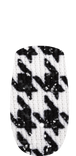
Please download a press-on nail design image sample, and refer to the image guidelines for further details. Download: [Nail_Design_Image_Guidelines.pdf](https://bcw-media.s3.ap-northeast-1.amazonaws.com/strapi/assets/You_Cam_API_AI_Nail_Virtual_Try_On_Press_on_Nail_Design_Image_Guidelines_a229b51750.pdf) | ≤ 1MB | png (with transparent background) |
Press-on nail design image sample:
[ ](https://bcw-media.s3.ap-northeast-1.amazonaws.com/strapi/assets/youcamapi_press_on_nail_design_image_sample_de6bd64f20.png)
---
**Supported Hand View**
| Item | Supported Dimensions | Supported File Size | Supported Formats |
| --- | --- | --- | --- |
| User Photo | * Long side ≤ 2048
](https://bcw-media.s3.ap-northeast-1.amazonaws.com/strapi/assets/youcamapi_press_on_nail_design_image_sample_de6bd64f20.png)
---
**Supported Hand View**
| Item | Supported Dimensions | Supported File Size | Supported Formats |
| --- | --- | --- | --- |
| User Photo | * Long side ≤ 2048
* Short side ≥ 256 | ≤ 10MB | jpg/jpeg/png |
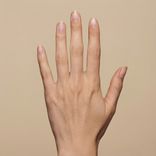
* Support only one hand in the input image
* The area of hand palm is better to be at least half of that of input image
* The aspect ratio of the input image is better to be 1:1, 3:4, 4:3
* The nails of fingers should not be occluded
* It is better that there is no nail tip and nail polish on the nail
---
* Error Codes
| Error Code | Description |
| ---- | ---- |
| error_nail_too_small | The nail regions are too small. |
| error_no_nail | No nails were detected in the source image. |
* Environment & Dependency
| Sample Code Language / Tool | Recommended Runtime Versions |
|---|---|
| cURL | - bash >= 3.2 - curl >= 7.58 (modern TLS/HTTP support) - jq >= 1.6 (robust JSON parsing) |
| Node.js (JavaScript) | Node >= 18 (for global fetch) |
| JavaScript | - Chrome / Edge >= 80 - Firefox >= 74 - Safari >= 13.1 |
| PHP | PHP >= 7.4 (for modern TLS/compat), ext-curl (recommended) or allow_url_fopen=On + ext-openssl, ext-json |
| Python | Python >= 3.10 (for f-strings), requests >= 2.20.0 |
| Java | Java 11+ (for HttpClient), Jackson Databind >= 2.12.0 |
---
## JS Camera Kit
{% partial file="/_partials/js-camera-kit.md" /%}
---
## Unit Consumption
| AI Feature | Unit Consumed |
|---|---|
| AI Nail Virtual Try-On V1.0 | 1 |
---
License: Privacy policy
## Servers
```
https://yce-api-01.makeupar.com
```
## Security
### BearerAuthenticationV2
[object Object]
Type: http
Scheme: bearer
## Download OpenAPI description
- [AI Nail Virtual Try-On](https://docs.perfectcorp.com/_bundle/reference/ai_nail_vto.yaml)
## V1.0
- [POST /s2s/v2.0/task/nail-vto](https://docs.perfectcorp.com/reference/ai_nail_vto/v1.0/paths/~1s2s~1v2.0~1task~1nail-vto/post.md): This endpoint initiates the nail virtual try-on process. You must provide source file(s) and reference image(s) (via URL or File ID), along with specific nail effect configurations. The task will be p
- [GET /s2s/v2.0/task/nail-vto/{task_id}](https://docs.perfectcorp.com/reference/ai_nail_vto/v1.0/paths/~1s2s~1v2.0~1task~1nail-vto~1%7Btask_id%7D/get.md)