AI skincare analysis technology harnesses the power of artificial intelligence to analyze various aspects of the skin, from texture and pigmentation to hydration and pore size, with remarkable precision. By employing advanced algorithms and machine learning, AI skin analysis can offer personalized recommendations and skincare routines tailored to an individual's unique skin type and concerns.
AI Skin Analysis
 AI skincare analysis technology harnesses the power of artificial intelligence to analyze various aspects of the skin, from texture and pigmentation to hydration and pore size, with remarkable precision. By employing advanced algorithms and machine learning, AI skin analysis can offer personalized recommendations and skincare routines tailored to an individual's unique skin type and concerns.
This not only enhances the effectiveness of skincare products but also empowers users to make informed decisions about their skincare regimen. With the integration of AI skin analysis, individuals can now embark on a journey towards healthier, more radiant skin, guided by data-driven insights and the promise of more effective skincare solutions.
- Step 1 — Initialize the Module
Call YMK.init() before calling YMK.openCameraKit():
YMK.init({
  faceDetectionMode: 'skincare',
  imageFormat: 'base64',
  language: 'enu'
});- Supported Detection Modes
Set faceDetectionMode in InitOptions to one of:
| Mode | Description |
|---|---|
makeup | Standard camera mode for virtual cosmetic try-on |
skincare | Standard skin analysis mode, close-up face capture |
hdskincare | HD Skin capture using webcams with ≥ 2560px width |
shadefinder | Skin Tone Analysis front-face capture |
hairlength | Full hair-length capture (from a distance) |
hairfrizziness | 3-phase capture: front, right-turn, left-turn |
hairtype | Same 3-phase multi-angle capture flow |
ring | Hand capture for ring try‑on |
wrist | Wrist capture for watch or bracelet try‑on |
necklace | Selfie capture for necklace try-on |
earring | Selfie capture for earring try-on |
- Step 2 — Add Event Handlers
Event examples:
YMK.addEventListener('faceQualityChanged', function(q) {
  console.log('Quality updated:', q);
});
See the full Events List below.
- Step 3 — Open Camera Kit
YMK.openCameraKit();This automatically:
- Shows the UI
- Opens webcam
- Begins real-time face quality monitoring
- Automatically captures when conditions are acceptable
- Step 4 — Receiving Captured Result
Captured images arrive via:
YMK.addEventListener('faceDetectionCaptured', function(result) {
  console.log(result.images);
});- Step 5 — Close Module
YMK.close();Input Paramenter Description There are two options for controlling the visual output of AI Skin Analysis results: either generate multiple images, with each skin concern displayed as an independent mask, or produce a single blended image using the
enable_mask_overlayparameter. By default, the system outputs multiple masks, giving you full control over how to blend each skin concern mask with the image.Default: enable_mask_overlay false
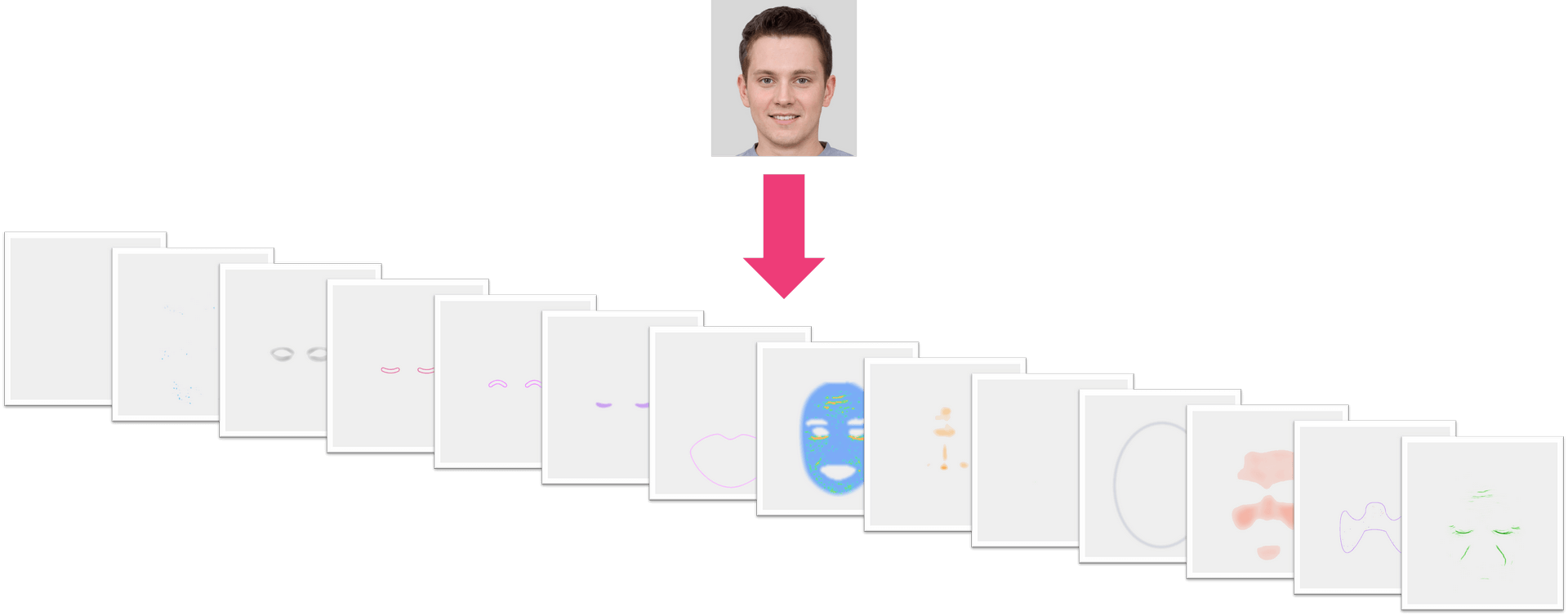
Set enable_mask_overlay to true
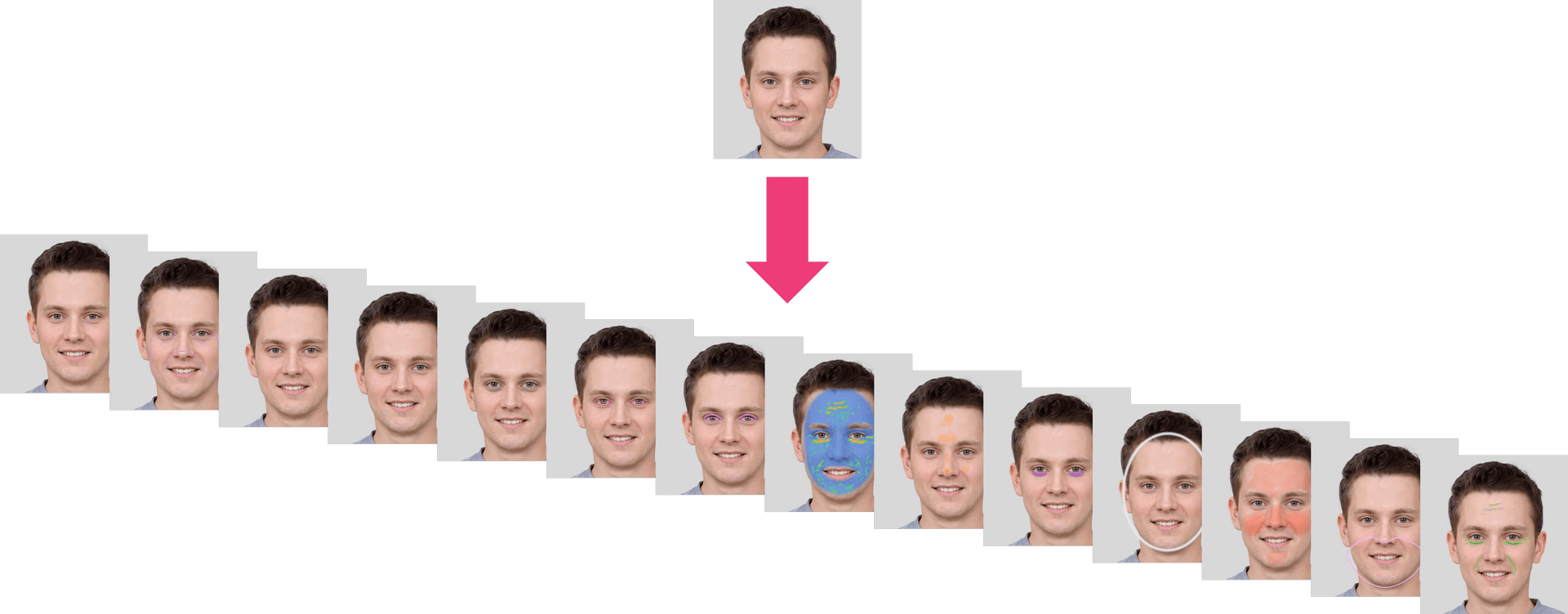
- Output ZIP Data Structure Description The system provides a ZIP file with a 'skinanalysisResult' folder inside. This folder contains a 'score_info.json' file that includes all the detection scores and references to the result images.
The 'score_info.json' file contains all the skin analysis detection results, with numerical scores and the names of the corresponding output mask files.
The PNG files are detection result masks that can be overlaid on your original image. Simply use the alpha values in these PNG files to blend them with your original image, allowing you to see the detection results directly on the source image.
File Structure in the Skin Analysis Result ZIP
HD Skincare ZIP
- skinanalysisResult
- score_info.json
- hd_acne_output.png
- hd_age_spot_output.png
- hd_dark_circle_output.png
- hd_droopy_lower_eyelid_output.png
- hd_droopy_upper_eyelid_output.png
- hd_eye_bag_output.png
- hd_firmness_output.png
- hd_moisture_output.png
- hd_oiliness_output.png
- hd_radiance_output.png
- hd_redness_output.png
- hd_texture_output.png
- hd_pore_output_all.png
- hd_pore_output_cheek.png
- hd_pore_output_forehead.png
- hd_pore_output_nose.png
- hd_wrinkle_output_all.png
- hd_wrinkle_output_crowfeet.png
- hd_wrinkle_output_forehead.png
- hd_wrinkle_output_glabellar.png
- hd_wrinkle_output_marionette.png
- hd_wrinkle_output_nasolabial.png
- hd_wrinkle_output_periocular.png
- skinanalysisResult
SD Skincare ZIP
- skinanalysisResult
- score_info.json
- acne_output.png
- age_spot_output.png
- dark_circle_v2_output.png
- droopy_lower_eyelid_output.png
- droopy_upper_eyelid_output.png
- eye_bag_output.png
- firmness_output.png
- moisture_output.png
- oiliness_output.png
- pore_output.png
- radiance_output.png
- redness_output.png
- texture_output.png
- wrinkle_output.png
- skinanalysisResult
JSON Data Structure (score_info.json)
"all": A floating-point value between 1 and 100 representing the general skin condition. A higher score indicates healthier and more aesthetically pleasing skin condition.
"skin_age": AI-derived skin age relative to the general population distribution across all age groups.
Each category contains:
- "raw_score": A floating-point value ranging from 1 to 100. A higher score indicates healthier and more aesthetically pleasing skin condition.
- "ui_score": An integer ranging from 1 to 100. The UI Score functions primarily as a psychological motivator in beauty assessment. We adjust the raw scores to produce more favorable results, acknowledging that consumers generally prefer positive evaluations regarding their skin health. This calibration serves to instill greater confidence in users while maintaining the underlying beauty psychology framework.
- "output_mask_name": The filename of the corresponding output mask image.
Categories and Descriptions
HD Skincare:
- "hd_redness": Measures skin redness severity.
- "hd_oiliness": Determines skin oiliness level.
- "hd_age_spot": Detects age spots and pigmentation.
- "hd_radiance": Evaluates skin radiance.
- "hd_moisture": Assesses skin hydration levels.
- "hd_dark_circle": Analyzes the presence of dark circles under the eyes.
- "hd_eye_bag": Detects eye bags.
- "hd_droopy_upper_eyelid": Measures upper eyelid drooping severity.
- "hd_droopy_lower_eyelid": Measures lower eyelid drooping severity.
- "hd_firmness": Evaluates skin firmness and elasticity.
- "hd_texture": Subcategories[whole]; Analyzes overall skin texture.
- "hd_acne": Subcategories[whole]; Detects acne presence.
- "hd_pore": Subcategories[forehead, nose, cheek, whole]; Detects and evaluates pores in different facial regions.
- "hd_wrinkle": Subcategories[forehead, glabellar, crowfeet, periocular, nasolabial, marionette, whole]; Measures the severity of wrinkles in various facial areas.
SD Skincare:
- "wrinkle": General wrinkle analysis.
- "droopy_upper_eyelid": Measures upper eyelid drooping severity.
- "droopy_lower_eyelid": Measures lower eyelid drooping severity.
- "firmness": Evaluates skin firmness and elasticity.
- "acne": Evaluates acne presence.
- "moisture": Measures skin hydration.
- "eye_bag": Detects eye bags.
- "dark_circle_v2": Analyzes dark circles using an alternative method.
- "age_spot": Detects age spots.
- "radiance": Evaluates skin brightness.
- "redness": Measures skin redness.
- "oiliness": Determines skin oiliness.
- "pore": Measures pore visibility.
- "texture": Analyzes overall skin texture.
Sample score_info.json of HD Skincare
{
    "hd_redness": {
        "raw_score": 72.011962890625,
        "ui_score": 77,
        "output_mask_name": "hd_redness_output.png"
    },
    "hd_oiliness": {
        "raw_score": 60.74365234375,
        "ui_score": 72,
        "output_mask_name": "hd_oiliness_output.png"
    },
    "hd_age_spot": {
        "raw_score": 83.23274230957031,
        "ui_score": 77,
        "output_mask_name": "hd_age_spot_output.png"
    },
    "hd_radiance": {
        "raw_score": 76.57244205474854,
        "ui_score": 79,
        "output_mask_name": "hd_radiance_output.png"
    },
    "hd_moisture": {
        "raw_score": 48.694559931755066,
        "ui_score": 70,
        "output_mask_name": "hd_moisture_output.png"
    },
    "hd_dark_circle": {
        "raw_score": 80.1993191242218,
        "ui_score": 76,
        "output_mask_name": "hd_dark_circle_output.png"
    },
    "hd_eye_bag": {
        "raw_score": 76.67280435562134,
        "ui_score": 79,
        "output_mask_name": "hd_eye_bag_output.png"
    },
    "hd_droopy_upper_eyelid": {
        "raw_score": 79.05348539352417,
        "ui_score": 80,
        "output_mask_name": "hd_droopy_upper_eyelid_output.png"
    },
    "hd_droopy_lower_eyelid": {
        "raw_score": 79.97175455093384,
        "ui_score": 81,
        "output_mask_name": "hd_droopy_lower_eyelid_output.png"
    },
    "hd_firmness": {
        "raw_score": 89.66898322105408,
        "ui_score": 85,
        "output_mask_name": "hd_firmness_output.png"
    },
    "hd_texture": {
        "whole": {
            "raw_score": 66.3921568627451,
            "ui_score": 75,
            "output_mask_name": "hd_texture_output.png"
        }
    },
    "hd_acne": {
        "whole": {
            "raw_score": 59.92677688598633,
            "ui_score": 76,
            "output_mask_name": "hd_acne_output.png"
        }
    },
    "hd_pore": {
        "forehead": {
            "raw_score": 79.59770965576172,
            "ui_score": 80,
            "output_mask_name": "hd_pore_output_forehead.png"
        },
        "nose": {
            "raw_score": 29.139814376831055,
            "ui_score": 58,
            "output_mask_name": "hd_pore_output_nose.png"
        },
        "cheek": {
            "raw_score": 44.11081314086914,
            "ui_score": 65,
            "output_mask_name": "hd_pore_output_cheek.png"
        },
        "whole": {
            "raw_score": 49.23978805541992,
            "ui_score": 67,
            "output_mask_name": "hd_pore_output_all.png"
        }
    },
    "hd_wrinkle": {
        "forehead": {
            "raw_score": 55.96956729888916,
            "ui_score": 67,
            "output_mask_name": "hd_wrinkle_output_forehead.png"
        },
        "glabellar": {
            "raw_score": 76.7251181602478,
            "ui_score": 75,
            "output_mask_name": "hd_wrinkle_output_glabellar.png"
        },
        "crowfeet": {
            "raw_score": 83.4361481666565,
            "ui_score": 78,
            "output_mask_name": "hd_wrinkle_output_crowfeet.png"
        },
        "periocular": {
            "raw_score": 67.88706302642822,
            "ui_score": 72,
            "output_mask_name": "hd_wrinkle_output_periocular.png"
        },
        "nasolabial": {
            "raw_score": 74.03312683105469,
            "ui_score": 74,
            "output_mask_name": "hd_wrinkle_output_nasolabial.png"
        },
        "marionette": {
            "raw_score": 71.94477319717407,
            "ui_score": 73,
            "output_mask_name": "hd_wrinkle_output_marionette.png"
        },
        "whole": {
            "raw_score": 49.64699745178223,
            "ui_score": 65,
            "output_mask_name": "hd_wrinkle_output_all.png"
        }
    },
    "all": {
        "score": 75.75757575757575
    },
    "skin_age": 37
}
Sample score_info.json of SD Skincare
{
    "wrinkle": {
        "raw_score": 36.09360456466675,
        "ui_score": 60,
        "output_mask_name": "wrinkle_output.png"
    },
    "droopy_upper_eyelid": {
        "raw_score": 79.05348539352417,
        "ui_score": 80,
        "output_mask_name": "droopy_upper_eyelid_output.png"
    },
    "droopy_lower_eyelid": {
        "raw_score": 79.97175455093384,
        "ui_score": 81,
        "output_mask_name": "droopy_lower_eyelid_output.png"
    },
    "firmness": {
        "raw_score": 89.66898322105408,
        "ui_score": 85,
        "output_mask_name": "firmness_output.png"
    },
    "acne": {
        "raw_score": 92.29713000000001,
        "ui_score": 88,
        "output_mask_name": "acne_output.png"
    },
    "moisture": {
        "raw_score": 48.694559931755066,
        "ui_score": 70,
        "output_mask_name": "moisture_output.png"
    },
    "eye_bag": {
        "raw_score": 76.67280435562134,
        "ui_score": 79,
        "output_mask_name": "eye_bag_output.png"
    },
    "dark_circle_v2": {
        "raw_score": 80.1993191242218,
        "ui_score": 76,
        "output_mask_name": "dark_circle_v2_output.png"
    },
    "age_spot": {
        "raw_score": 83.23274230957031,
        "ui_score": 77,
        "output_mask_name": "age_spot_output.png"
    },
    "radiance": {
        "raw_score": 76.57244205474854,
        "ui_score": 79,
        "output_mask_name": "radiance_output.png"
    },
    "redness": {
        "raw_score": 72.011962890625,
        "ui_score": 77,
        "output_mask_name": "redness_output.png"
    },
    "oiliness": {
        "raw_score": 60.74365234375,
        "ui_score": 72,
        "output_mask_name": "oiliness_output.png"
    },
    "pore": {
        "raw_score": 88.38014125823975,
        "ui_score": 84,
        "output_mask_name": "pore_output.png"
    },
    "texture": {
        "raw_score": 80.09742498397827,
        "ui_score": 76,
        "output_mask_name": "texture_output.png"
    },
    "all": {
        "score": 75.75757575757575
    },
    "skin_age": 37
}
- Supported Formats & Dimensions
| AI Feature | Supported Dimensions | Supported File Size | Supported Formats |
|---|---|---|---|
| SD Skincare | long side <= 1920, short side >= 480 | < 10MB | jpg/jpeg/png |
| HD Skincare | long side <= 2560, short side >= 1080 | < 10MB | jpg/jpeg/png |
Warning: It is your resposibility to resize input images based on the Supported Dimensions of HD or SD Skincare before runing AI Skin Analysis. It is highly recommended to use portrait rather than landscape aspect ratio as input.
Suggestions for How to Shoot:

Get Ready to Start Skin Analysis Instructions
Take off your glasses and make sure bangs are not covering your forehead
Make sure that you’re in a well-lit environment
Remove makeup to get more accurate results
Look straight into the camera and keep your face in the center
Photo requirement
We will check the image quality to ensure it is suitable for AI Skin Analysis. Please make sure the face occupies approximately 60–80% of the image width, without any overlays or obstructions. The lighting should be bright and evenly distributed, avoiding overexposure or blown-out highlights. The pose should be front-facing, neutral, and relaxed, with the mouth closed and eyes open.
You should fully reveal your forehead and brush your fringe back or tie your hair to ensure the best quality. It is recommended that you remove your spectacles for optimal AI Skin Analysis performance, although this is not mandatory.
Warning: The width of the face needs to be greater than 60% of the width of the image.

- Error Codes
| Error Code | Description |
|---|---|
| error_below_min_image_size | Input image resolution is too small |
| error_exceed_max_image_size | Input image resolution is too large |
| error_src_face_too_small | The face area in the uploaded image is too small. The width of the face needs to be greater than 60% of the width of the image. |
| error_src_face_out_of_bound | The face area in the uploaded image is out of bound |
| error_lighting_dark | The lighting in the uploaded image is too dark |
- Environment & Dependency
| Sample Code Language / Tool | Recommended Runtime Versions |
|---|---|
| cURL | - bash >= 3.2 - curl >= 7.58 (modern TLS/HTTP support) - jq >= 1.6 (robust JSON parsing) |
| Node.js (JavaScript) | Node >= 18 (for global fetch) |
| JavaScript | - Chrome / Edge >= 80 - Firefox >= 74 - Safari >= 13.1 |
| PHP | PHP >= 7.4 (for modern TLS/compat), ext-curl (recommended) or allow_url_fopen=On + ext-openssl, ext-json |
| Python | Python >= 3.10 (for f-strings), requests >= 2.20.0 |
| Java | Java 11+ (for HttpClient), Jackson Databind >= 2.12.0 |
- Overview
The JavaScript Camera Kit provides a complete in-browser camera solution designed for high-accuracy face-based imaging tasks. It includes:
- Camera permission handling
- Real-time face detection
- Automatic face quality validation (lighting, pose, angle, distance)
- Guided capture UI
- Multi-step capture flows for advanced hair/face tasks
- Support for both base64 and blob output formats
The module is particularly optimized for AI-driven image analysis, such as AI Skin Analysis (SD/HD), AI Face Tone Analysis, and hair-related analysis.
- Download the JS Camera Kit Include the JS Camera Kit SDK via CDN:
https://plugins-media.makeupar.com/v2.2-camera-kit/sdk.jsOnce loaded, the SDK installs a global YMK object.
- Quick Start Example
The following sample demonstrates:
- Loading the JS Camera Kit SDK
- Implementing
window.ymkAsyncInit - Initializing the module
- Opening the camera
- Receiving captured images
<!DOCTYPE html>
<html lang="en">
  <head>
    <meta charset="UTF-8" />
    <meta name="viewport" content="width=device-width, initial-scale=1.0" />
    <title>Camera Kit Sample</title>
  </head>

  <body>
    <script>
      window.ymkAsyncInit = function() {
        YMK.addEventListener('loaded', function() {
          /* Module fully loaded and ready */
        });

        YMK.addEventListener('faceDetectionCaptured', function(capturedResult) {
          /* Display all captured images */
          const container = document.getElementById('captured-results');
          container.innerHTML = '';

          for (const image of capturedResult.images) {
            const img = document.createElement('img');
            img.src = typeof image.image === 'string'
              ? image.image
              : URL.createObjectURL(image.image);

            container.appendChild(img);
          }
        });
      };

      function openCameraKit() {
        YMK.init({
          faceDetectionMode: 'skincare',
          imageFormat: 'base64',
          language: 'enu',
        });
        YMK.openCameraKit();
      }
    </script>

    <!-- Load SDK -->
    <script>
      window.addEventListener('load', function() {
        (function(d) {
          const s = d.createElement('script');
          s.type = 'text/javascript';
          s.async = true;
          s.src = 'https://plugins-media.makeupar.com/v2.2-camera-kit/sdk.js';
          d.getElementsByTagName('script')[0].parentNode.insertBefore(s, null);
        })(document);
      });
    </script>

    <button onClick="openCameraKit()">Open Camera Kit</button>

    <div id="YMK-module"></div>

    <h3>Captured Results:</h3>
    <div id="captured-results"></div>
  </body>
</html>- Prerequisites
You must define the asynchronous initialization entry point:
<script>
  window.ymkAsyncInit = function() {
    YMK.init(); // default settings
  };
</script>
Additional requirements:
| Requirement | Description |
|---|---|
| Browser | Must support getUserMedia |
| HTTPS | Required on most browsers for webcam access |
<div id="YMK-module"> | Mandatory mount point for the UI |
Download OpenAPI description
Overview
Languages
Servers
https://yce-api-01.makeupar.com
Request
To upload a new file, you'll first need to use the File API. It will give you a URL – use that URL to upload your file. Once the upload is finished, you can use the file_id from the same response to start using our AI features.
Security
BearerAuthenticationV2
Content MIME type for this file. Currently available values are listed in the enum.
Example: "image/jpg"
- https://yce-api-01.makeupar.com/s2s/v2.0/file/skin-analysis
- curl
- JavaScript
- Node.js
- Python
- Java
- C#
- PHP
- Go
- Ruby
- R
- Payload
curl -i -X POST \
  https://yce-api-01.makeupar.com/s2s/v2.0/file/skin-analysis \
  -H 'Authorization: Bearer <YOUR_TOKEN_HERE>' \
  -H 'Content-Type: application/json' \
  -d '{
    "files": [
      {
        "content_type": "image/jpg",
        "file_name": "my-selfie.jpg",
        "file_size": 50000
      }
    ]
}'Response
application/json
{
  "status": 200,
  "data": {
    "files": [ … ]
  }
}
Request
Create a skin analysis task using either a file_id (from the File API) or a publicly accessible image URL. The task will analyze various skin attributes based on the specified dst_actions.
Security
BearerAuthenticationV2
Any of:
This object represents a run Skin Analysis task.
Url of the file to run task. The url should be publicly accessible.
Example: "https://example.com/selfie.jpg"
The actions for Skin Analysis. There are 2 types of features: HD and SD. You can choose one or more features, either all in SD or all in HD. Note: HD and SD features cannot be mixed. HD features:
- hd_redness: Measures skin redness severity.
- hd_oiliness: Determines skin oiliness level.
- hd_age_spot: Detects age spots and pigmentation.
- hd_radiance: Evaluates skin radiance.
- hd_moisture: Assesses skin hydration levels.
- hd_dark_circle: Analyzes the presence of dark circles under the eyes.
- hd_eye_bag: Detects eye bags.
- hd_droopy_upper_eyelid: Measures upper eyelid drooping severity.
- hd_droopy_lower_eyelid: Measures lower eyelid drooping severity.
- hd_firmness: Evaluates skin firmness and elasticity.
- hd_texture: Analyzes overall skin texture.
- hd_acne: Detects acne presence.
- hd_pore: Detects and evaluates pores in different facial regions (forehead, nose, cheek, whole).
- hd_wrinkle: Measures the severity of wrinkles in various facial areas (forehead, glabellar, crowfeet, periocular, nasolabial, marionette, whole).
- hd_tear_trough: Detects tear trough.
- hd_skin_type: Evalutate skin type.
SD features:
- wrinkle: General wrinkle analysis.
- droopy_upper_eyelid: Measures upper eyelid drooping severity.
- droopy_lower_eyelid: Measures lower eyelid drooping severity.
- firmness: Evaluates skin firmness and elasticity.
- acne: Evaluates acne presence.
- moisture: Measures skin hydration.
- eye_bag: Detects eye bags.
- dark_circle_v2: Analyzes dark circles.
- age_spot: Detects age spots.
- radiance: Evaluates skin brightness.
- redness: Measures skin redness.
- oiliness: Determines skin oiliness.
- pore: Measures pore visibility.
- texture: Analyzes overall skin texture.
- tear_trough: Detects tear trough.
- skin_type: Evalutate skin type.
Items Enum"hd_wrinkle""hd_pore""hd_texture""hd_acne""hd_oiliness""hd_radiance""hd_eye_bag""hd_age_spot""hd_dark_circle""hd_droopy_upper_eyelid"
Example: ["hd_wrinkle","hd_pore","hd_texture","hd_acne"]
Response format of the analysis results. Default is 'zip'. - zip: Results will be packaged as a downloadable ZIP file containing a skinanalysisResult folder with score_info.json and all detection result images. The response will include a URL to download the ZIP file. - json: Results will be returned directly in the response body as JSON format. Note: The response schema differs between format=json and format=zip.
Enum"json""zip"
Example: "zip"
- https://yce-api-01.makeupar.com/s2s/v2.0/task/skin-analysis
- curl
- JavaScript
- Node.js
- Python
- Java
- C#
- PHP
- Go
- Ruby
- R
- Payload
- Run task with src file url
- Run task with src file ID
curl -i -X POST \
  https://yce-api-01.makeupar.com/s2s/v2.0/task/skin-analysis \
  -H 'Authorization: Bearer <YOUR_TOKEN_HERE>' \
  -H 'Content-Type: application/json' \
  -d '{
    "src_file_url": "https://example.com/selfie.jpg",
    "dst_actions": [
      "hd_wrinkle",
      "hd_pore",
      "hd_texture",
      "hd_acne"
    ],
    "miniserver_args": {
      "enable_mask_overlay": true,
      "enable_dark_background_hd_pore": true,
      "color_dark_background_hd_pore": "3D3D3D",
      "opacity_dark_background_hd_pore": 0.4,
      "enable_dark_background_hd_wrinkle": true,
      "color_dark_background_hd_wrinkle": "3D3D3D",
      "opacity_dark_background_hd_wrinkle": 0.4
    },
    "format": "zip"
}'Response
application/json
{
  "status": 200,
  "data": {
    "task_id": "grH0CvsgXuAIHLUzD0V1Ol34hoet3R1tvdbtiVHrDb6_UqCLKIejAIajwxrhOAfe"
  }
}
- https://yce-api-01.makeupar.com/s2s/v2.0/task/skin-analysis/{task_id}
- curl
- JavaScript
- Node.js
- Python
- Java
- C#
- PHP
- Go
- Ruby
- R
- Payload
curl -i -X GET \
  https://yce-api-01.makeupar.com/s2s/v2.0/task/skin-analysis/grH0CvsgXuAIHLUzD0V1Ol34hoet3R1tvdbtiVHrDb6_UqCLKIejAIajwxrhOAfe \
-H 'Authorization: Bearer <YOUR_TOKEN_HERE>'Response
application/json
- format_zip_success
- format_json_success
{
  "status": 200,
  "data": {
    "task_status": "success",
    "results": "https://example.com/sample-result-url"
  }
}
Request
To upload a new file, you'll first need to use the File API. It will give you a URL – use that URL to upload your file. Once the upload is finished, you can use the file_id from the same response to start using our AI features.
Security
BearerAuthenticationV2
Content MIME type for this file. Currently available values are listed in the enum.
Example: "image/jpg"
- https://yce-api-01.makeupar.com/s2s/v2.1/file/skin-analysis
- curl
- JavaScript
- Node.js
- Python
- Java
- C#
- PHP
- Go
- Ruby
- R
- Payload
curl -i -X POST \
  https://yce-api-01.makeupar.com/s2s/v2.1/file/skin-analysis \
  -H 'Authorization: Bearer <YOUR_TOKEN_HERE>' \
  -H 'Content-Type: application/json' \
  -d '{
    "files": [
      {
        "content_type": "image/jpg",
        "file_name": "my-selfie.jpg",
        "file_size": 50000
      }
    ]
}'Response
application/json
{
  "status": 200,
  "data": {
    "files": [ … ]
  }
}
Request
Once you start an AI task, you need to keep polling at given polling_interval to check its status until it shows either success or error because if you don't, the task will time out and when you try to check the status later, you'll get an InvalidTaskId error even if the task did finish successfully and your units will still be consumed.
Security
BearerAuthenticationV2
Any of:
This object represents a run Skin Analysis task.
Url of the file to run task. The url should be publicly accessible.
Example: "https://example.com/selfie.jpg"
The actions for Skin Analysis. There are 2 types of features: HD and SD. You can choose one or more features, either all in SD or all in HD. Note: HD and SD features cannot be mixed. HD features:
- hd_redness: Measures skin redness severity.
- hd_oiliness: Determines skin oiliness level.
- hd_age_spot: Detects age spots and pigmentation.
- hd_radiance: Evaluates skin radiance.
- hd_moisture: Assesses skin hydration levels.
- hd_dark_circle: Analyzes the presence of dark circles under the eyes.
- hd_eye_bag: Detects eye bags.
- hd_droopy_upper_eyelid: Measures upper eyelid drooping severity.
- hd_droopy_lower_eyelid: Measures lower eyelid drooping severity.
- hd_firmness: Evaluates skin firmness and elasticity.
- hd_texture: Analyzes overall skin texture.
- hd_acne: Detects acne presence.
- hd_pore: Detects and evaluates pores in different facial regions (forehead, nose, cheek, whole).
- hd_wrinkle: Measures the severity of wrinkles in various facial areas (forehead, glabellar, crowfeet, periocular, nasolabial, marionette, whole).
- hd_tear_trough: Detects tear trough.
- hd_skin_type: Evalutate skin type.
SD features:
- wrinkle: General wrinkle analysis.
- droopy_upper_eyelid: Measures upper eyelid drooping severity.
- droopy_lower_eyelid: Measures lower eyelid drooping severity.
- firmness: Evaluates skin firmness and elasticity.
- acne: Evaluates acne presence.
- moisture: Measures skin hydration.
- eye_bag: Detects eye bags.
- dark_circle_v2: Analyzes dark circles.
- age_spot: Detects age spots.
- radiance: Evaluates skin brightness.
- redness: Measures skin redness.
- oiliness: Determines skin oiliness.
- pore: Measures pore visibility.
- texture: Analyzes overall skin texture.
- tear_trough: Detects tear trough.
- skin_type: Evalutate skin type.
Items Enum"hd_wrinkle""hd_pore""hd_texture""hd_acne""hd_oiliness""hd_radiance""hd_eye_bag""hd_age_spot""hd_dark_circle""hd_droopy_upper_eyelid"
Example: ["hd_wrinkle","hd_pore","hd_texture","hd_acne"]
Response format of the analysis results. Default is 'zip'. - zip: Results will be packaged as a downloadable ZIP file containing a skinanalysisResult folder with score_info.json and all detection result images. The response will include a URL to download the ZIP file. - json: Results will be returned directly in the response body as JSON format. Note: The response schema differs between format=json and format=zip.
Enum"json""zip"
Example: "zip"
- https://yce-api-01.makeupar.com/s2s/v2.1/task/skin-analysis
- curl
- JavaScript
- Node.js
- Python
- Java
- C#
- PHP
- Go
- Ruby
- R
- Payload
- Run task with src file url
- Run task with src file ID
curl -i -X POST \
  https://yce-api-01.makeupar.com/s2s/v2.1/task/skin-analysis \
  -H 'Authorization: Bearer <YOUR_TOKEN_HERE>' \
  -H 'Content-Type: application/json' \
  -d '{
    "src_file_url": "https://example.com/selfie.jpg",
    "dst_actions": [
      "hd_wrinkle",
      "hd_pore",
      "hd_texture",
      "hd_acne"
    ],
    "miniserver_args": {
      "enable_mask_overlay": true,
      "enable_dark_background_hd_pore": true,
      "color_dark_background_hd_pore": "3D3D3D",
      "opacity_dark_background_hd_pore": 0.4,
      "enable_dark_background_hd_wrinkle": true,
      "color_dark_background_hd_wrinkle": "3D3D3D",
      "opacity_dark_background_hd_wrinkle": 0.4
    },
    "format": "zip",
    "pf_camera_kit": true
}'Response
application/json
{
  "status": 200,
  "data": {
    "task_id": "grH0CvsgXuAIHLUzD0V1Ol34hoet3R1tvdbtiVHrDb6_UqCLKIejAIajwxrhOAfe"
  }
}
- https://yce-api-01.makeupar.com/s2s/v2.1/task/skin-analysis/{task_id}
- curl
- JavaScript
- Node.js
- Python
- Java
- C#
- PHP
- Go
- Ruby
- R
- Payload
curl -i -X GET \
  https://yce-api-01.makeupar.com/s2s/v2.1/task/skin-analysis/grH0CvsgXuAIHLUzD0V1Ol34hoet3R1tvdbtiVHrDb6_UqCLKIejAIajwxrhOAfe \
-H 'Authorization: Bearer <YOUR_TOKEN_HERE>'Response
application/json
- format_zip_success
- format_json_success
{
  "status": 200,
  "data": {
    "task_status": "success",
    "results": "https://example.com/sample-result-url"
  }
}