- 点数消耗 (Unit Consumption)
AI 时装虚拟试穿 Mix & Match
一次调用试穿整套穿搭。送一张用户照片加上 1 到 9 张单品参考图,AI Outfit Virtual Try-On Mix & Match API 会一次为人物穿上所有单品,返回一张完整造型照。
- 一次调用、一套造型:单个任务就让人物穿上全部参考单品,结果照片恰好一张。
- 八类单品:
upper_body、lower_body、full_body、outer、shoes、bag、headwear、accessory。 - 穿法备注:可以说明怎么穿,例如"外套敞开穿""上衣扎进裤腰"。只改变穿法,不会动单品本身、人物或姿势。
使用示例:
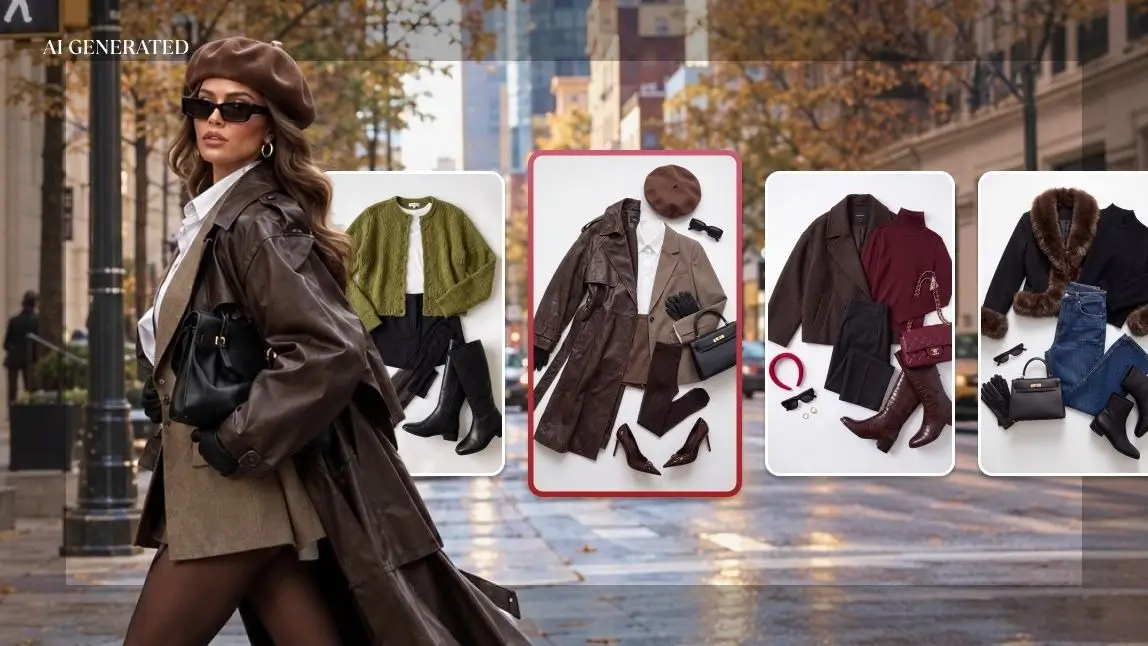

- AI 时装虚拟试穿 Mix & Match 使用指南
本指南说明如何上传用户照片与参考单品、创建试穿任务并解读结果。任务采用异步:创建任务的响应会给出任务 ID,您轮询状态端点获取结果。
- 第 1 步:用 File API 上传照片
用 File API(/s2s/v2.0/file)上传一张用户照片和 1 到 9 张参考图,每张图一个单品。响应会给出每个文件的 file_id 和 requests.url,把文件内容上传到该 URL 即可。您也可以把照片放在公开网址,直接传 URL。
请保持参考图与单品类别的顺序一致:第 n 张参考图对应 garment_categories 第 n 个类别的单品。
- 第 2 步:创建试穿任务
用 AI 任务 API(/s2s/v2.0/task/cloth-mix-v2),传入用户照片、参考图、每张图的类别,以及可选的穿法备注:
curl --request POST \
  --url https://yce-api-01.makeupar.com/s2s/v2.0/task/cloth-mix-v2 \
  --header 'Authorization: Bearer YOUR_API_KEY' \
  --header 'content-type: application/json' \
  --data '{
    "src_file_url": "https://example.com/selfie.jpg",
    "ref_file_urls": [
      "https://example.com/1.jpg",
      "https://example.com/2.jpg",
      "https://example.com/3.jpg"
    ],
    "garment_categories": ["upper_body", "lower_body", "shoes"],
    "styling_note": "tuck the top in"
  }'
garment_categories必填,长度必须与参考图数组一致;长度不符会返回invalid_parameter。任务大约需要 40 到 50 秒,附穿法备注会多 3 到 4 秒。超过 400 秒仍未完成的任务会以unknown_internal_error失败,可重试。
- 第 3 步:轮询任务结果
用创建任务响应里的 task_id 查询状态,直到 task_status 变成 success 或 error:
curl --request GET \
  --url https://yce-api-01.makeupar.com/s2s/v2.0/task/cloth-mix-v2/YOUR_TASK_ID \
  --header 'Authorization: Bearer YOUR_API_KEY' \
--header 'content-type: application/json'- 第 4 步:获取结果
成功的响应会返回一张造型照。带了穿法备注时,not_applied 会列出没有照做的部分及原因;其余一律照常套用。
{
  "status": 200,
  "data": {
    "error": null,
    "results": {
      "url": "https://example.com/sample-result-url",
      "not_applied": "bottom high-waisted: the trousers are already high-waisted"
    },
    "task_status": "success"
  }
}
只有返回结果照片时才消耗点数。以错误结束的任务不扣点。
- 请求体
src_file_url / src_file_id:二选一。ref_file_urls / ref_file_ids:二选一。
| 字段 | 类型 | 必填 | 默认 | 说明 |
|---|---|---|---|---|
| src_file_url / src_file_id | string | 是* | - | 用户照片,公开可访问的 URL 或 File API 的文件 ID |
| ref_file_urls / ref_file_ids | string 数组 | 是* | - | 1 到 9 张参考图,每张一个单品,顺序与 garment_categories 一致 |
| garment_categories | string 数组(enum) | 是 | - | 每张参考图的类别,顺序和长度与参考图数组一致:upper_body、lower_body、full_body、outer、shoes、bag、headwear、accessory |
| styling_note | string | 否 | "" | 穿法备注,最多 300 字符自由文字,例如 "tuck the top in"、"wear the jacket open"、"carry the bag crossbody" |
- 单品类别
| garment_category | 内容 | 上限 |
|---|---|---|
| upper_body | 上装 | 1 |
| lower_body | 下装 | 1 |
| full_body | 连身款,例如连衣裙 | 1,不可与 upper_body 或 lower_body 并用 |
| outer | 外套、马甲 | 1 |
| shoes | 鞋子 | 1 |
| bag | 包 | 1 |
| headwear | 帽子、发带 | 1 |
| accessory | 眼镜、项链、耳环、手表、腰带、围巾 | 3 |
您发送的类别会照原样使用,引擎不会重新分类。配饰的摆放位置由引擎决定,新配饰会替换人物在同一位置佩戴的既有配饰。
- 结果(
data.results)
| 字段 | 类型 | 说明 |
|---|---|---|
| url | string | 下载结果照片的 URL。有效期 2 小时 |
| not_applied | string | styling_note 中未套用的部分及原因。只在给了 styling_note 时返回 |
- 支持格式与尺寸
| 项目 | 支持尺寸 | 支持文件大小 | 支持格式 |
|---|---|---|---|
| 用户照片 | 正面照片。最小 512 x 384,最长边 4096 px。宽高比上限 3:1,超出部分从中间裁切 | < 10MB | JPEG, PNG, HEIC |
| 参考图 | 最小 512 x 384,最长边 4096 px。不裁切(腰带、项链类可超过 3:1) | < 10MB | JPEG, PNG, HEIC |
| 结果照片 | 保持用户照片的宽高比,上限约 1.5 MP(1024 x 1536);最长边低于 1024 会放大到 1024。例:3000 x 4000 -> 1072 x 1440、4000 x 1000 -> 2160 x 720 | - | JPEG |
透明背景的照片会在白底上合成。结果照片带有 C2PA 签名。
- 错误码
| 错误码 | 说明 |
|---|---|
| invalid_parameter | 参数缺失或无效;消息会指明是哪个参数 |
| error_download_image | 无法下载用户照片或参考图 |
| error_invalid_src | 无法读取用户照片 |
| error_invalid_ref | 无法读取参考图 |
| error_analyze_failed | 单品分析失败或超时 |
| error_ref_categories | 这些单品无法一起穿:类别重复、full_body 与 upper_body/lower_body 并用、bag 或 headwear 超过 1 个、accessory 超过 3 个 |
| error_nsfw_content_detected | 检测到不当内容,拒绝生成 |
| unknown_internal_error | 其他错误,含 400 秒内未完成的任务 |