- 輸入與輸出 (Inputs & Outputs)
AI 虛擬換裝 Mix & Match
一次呼叫試穿整套穿搭。送一張使用者照片加上 1 到 9 張單品參考圖,AI Outfit Virtual Try-On Mix & Match API 會一次為人物穿上所有單品,回傳一張完整造型照。
- 一次呼叫、一套造型:單一任務就讓人物的身上出現全部參考單品,結果照片恰好一張。
- 八種單品類別:
upper_body、lower_body、full_body、outer、shoes、bag、headwear、accessory。 - 穿法備註:可以指定怎麼穿,例如「外套敞開穿」「上衣紮進褲頭」。只影響穿法,不會動到單品本身、人物或姿勢。
使用示例:
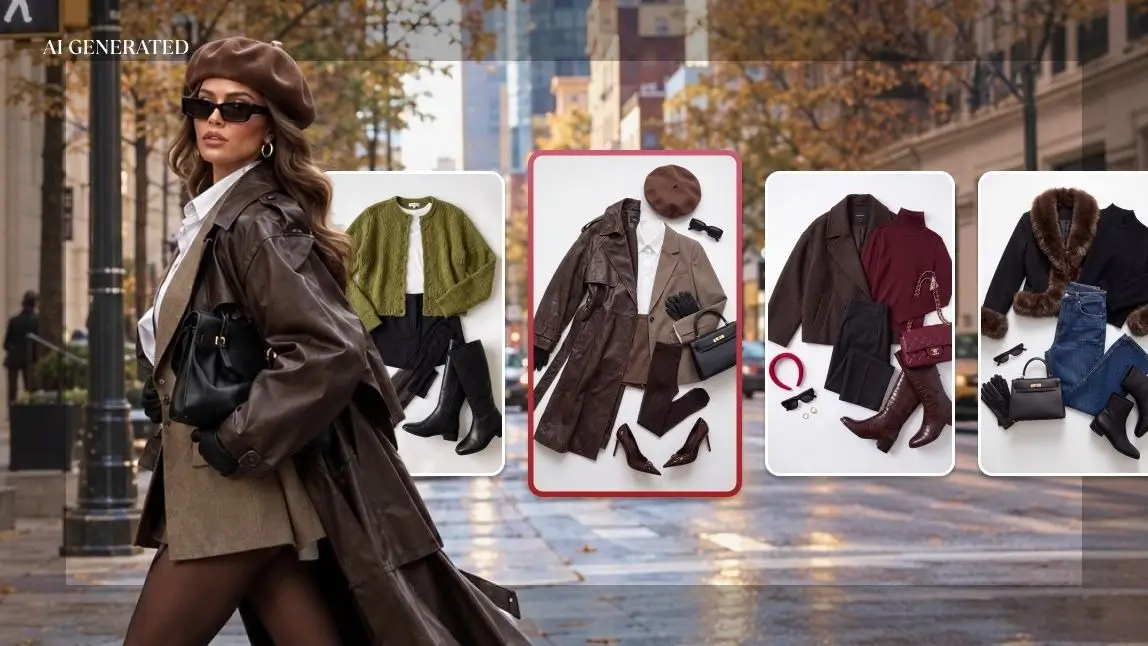

- AI 虛擬換裝 Mix & Match 使用指南
本指南說明如何上傳使用者照片與參考單品、建立試穿任務並解讀結果。任務採非同步:建立任務的回應會給任務 ID,您輪詢狀態端點取得結果。
- 步驟 1. 用 File API 上傳照片
用 File API(/s2s/v2.0/file)上傳一張使用者照片與 1 到 9 張參考圖,每張圖一個單品。回應會給每個檔案的 file_id 與 requests.url,把檔案內容上傳到該 URL 即可。您也可以把照片放在公開網址,直接傳 URL。
請保持參考圖與單品類別的順序一致:第 n 張參考圖,對應 garment_categories 第 n 個類別的單品。
- 步驟 2. 建立試穿任務
用 AI 任務 API(/s2s/v2.0/task/cloth-mix-v2),傳入使用者照片、參考圖、每張圖的類別,以及選填的穿法備註:
curl --request POST \
  --url https://yce-api-01.makeupar.com/s2s/v2.0/task/cloth-mix-v2 \
  --header 'Authorization: Bearer YOUR_API_KEY' \
  --header 'content-type: application/json' \
  --data '{
    "src_file_url": "https://example.com/selfie.jpg",
    "ref_file_urls": [
      "https://example.com/1.jpg",
      "https://example.com/2.jpg",
      "https://example.com/3.jpg"
    ],
    "garment_categories": ["upper_body", "lower_body", "shoes"],
    "styling_note": "tuck the top in"
  }'
garment_categories是必填,長度必須與參考圖陣列相同;長度不符會回傳invalid_parameter。任務大約需要 40 到 50 秒,附穿法備註會多 3 到 4 秒。超過 400 秒仍未完成的任務會以unknown_internal_error失敗,可重試。
- 步驟 3. 輪詢任務結果
用建立任務回應裡的 task_id 查詢狀態,直到 task_status 變成 success 或 error:
curl --request GET \
  --url https://yce-api-01.makeupar.com/s2s/v2.0/task/cloth-mix-v2/YOUR_TASK_ID \
  --header 'Authorization: Bearer YOUR_API_KEY' \
--header 'content-type: application/json'- 步驟 4. 取得結果
成功的回應會回傳一張造型照。有附穿法備註時,not_applied 會列出沒照做的部分與原因;其餘一律照常套用。
{
  "status": 200,
  "data": {
    "error": null,
    "results": {
      "url": "https://example.com/sample-result-url",
      "not_applied": "bottom high-waisted: the trousers are already high-waisted"
    },
    "task_status": "success"
  }
}
只有回傳結果照片時才會消耗點數。以錯誤結束的任務不扣點。
- 請求主體
src_file_url / src_file_id:兩者取一。ref_file_urls / ref_file_ids:兩者取一。
| 欄位 | 型別 | 必填 | 預設 | 說明 |
|---|---|---|---|---|
| src_file_url / src_file_id | string | 是* | - | 使用者照片,公開可取的 URL 或 File API 的檔案 ID |
| ref_file_urls / ref_file_ids | string 陣列 | 是* | - | 1 到 9 張參考圖,每張一個單品,順序與 garment_categories 一致 |
| garment_categories | string 陣列(enum) | 是 | - | 每張參考圖的類別,順序與長度和參考圖陣列一致:upper_body、lower_body、full_body、outer、shoes、bag、headwear、accessory |
| styling_note | string | 否 | "" | 穿法備註,最多 300 字自由文字,例如 "tuck the top in"、"wear the jacket open"、"carry the bag crossbody" |
- 單品類別
| garment_category | 內容 | 上限 |
|---|---|---|
| upper_body | 上衣 | 1 |
| lower_body | 下身單品 | 1 |
| full_body | 連身款,例如洋裝 | 1,不可與 upper_body 或 lower_body 併用 |
| outer | 外套、背心 | 1 |
| shoes | 鞋子 | 1 |
| bag | 包 | 1 |
| headwear | 帽子、髮帶 | 1 |
| accessory | 眼鏡、項鍊、耳環、手錶、腰帶、圍巾 | 3 |
您送來的類別會照原樣使用,引擎不會重新分類。配件擺放位置由引擎決定,新配件會取代人物身上同一位置的既有配件。
- 結果(
data.results)
| 欄位 | 型別 | 說明 |
|---|---|---|
| url | string | 下載結果照片的 URL。有效 2 小時 |
| not_applied | string | styling_note 中未套用的部分與原因。只在有給 styling_note 時回傳 |
- 支援格式與尺寸
| 項目 | 支援尺寸 | 支援檔案大小 | 支援格式 |
|---|---|---|---|
| 使用者照片 | 正面照片。最小 512 x 384,最長邊 4096 px。長寬比上限 3:1,超出部分從中央裁切 | < 10MB | JPEG, PNG, HEIC |
| 參考圖 | 最小 512 x 384,最長邊 4096 px。不裁切(腰帶、項鍊類可超過 3:1) | < 10MB | JPEG, PNG, HEIC |
| 結果照片 | 維持使用者照片的長寬比,上限約 1.5 MP(1024 x 1536);最長邊低於 1024 會放大到 1024。例:3000 x 4000 -> 1072 x 1440、4000 x 1000 -> 2160 x 720 | - | JPEG |
透明背景的照片會以白底合成。結果照片附有 C2PA 簽章。
- 錯誤碼
| 錯誤碼 | 說明 |
|---|---|
| invalid_parameter | 參數缺少或無效;訊息會標明是哪個參數 |
| error_download_image | 無法下載使用者照片或參考圖 |
| error_invalid_src | 無法讀取使用者照片 |
| error_invalid_ref | 無法讀取參考圖 |
| error_analyze_failed | 單品分析失敗或逾時 |
| error_ref_categories | 這些單品無法一起穿:類別重複、full_body 與 upper_body/lower_body 併用、bag 或 headwear 超過 1 個、accessory 超過 3 個 |
| error_nsfw_content_detected | 偵測到不當內容,拒絕生成 |
| unknown_internal_error | 其他錯誤,含 400 秒內未完成的任務 |