The Model Context Protocol (MCP) is a lightweight, JSON‑based wrapper that enables client applications (e.g., Cursor, Copilot in VS Code, Claude for Desktop) to invoke the YouCam AI services without dealing with low‑level HTTP details.
Key benefits: By adding a single entry to MCP configuration JSON file and supplying your YouCam API key, any MCP‑compatible client (Cursor, Copilot in VS Code, Claude for Desktop) can instantly access the full suite of YouCam AI services - skin analysis, cloth virtual try‑on, hair styling, fashion rendering, and more functions. The client abstracts request formatting, authentication handling, and asynchronous polling, allowing developers to focus on workflow integration rather than low‑level API mechanics.
- An MCP‑compatible client installed (Cursor, Copilot in VS Code, Claude for Desktop, etc.).
- Network access to
https://mcp-api-01.makeupar.com. - A valid YouCam API key (see next Section).
The client itself already implements request/response serialization and polling logic; no additional code is required from the developer.
- Navigate to the API‑key console: https://yce.makeupar.com/api-console/en/api-keys/
- Create a new key or copy an existing one.
- Store the key securely (environment variable, secret manager, etc.).
Example environment variable (adjust for your deployment):
YOUR_API_KEY=your‑api‑key
MCP clients read a JSON configuration file named mcp.json. Add an entry for the YouCam MCP server as shown below:
{
  "mcpServers": {
    "youcam-api-mcp": {
      "url": "https://mcp-api-01.makeupar.com/mcp",
      "headers": {
        "Authorization": "Bearer YOUR_API_KEY"
      }
    }
  }
}
Configuration steps
| Step | Action |
|---|---|
| 1. Setup MCP configuration JSON file | Put the file in the root of your project or in the client‑specific configuration directory (refer to each client’s documentation). |
| 2. Replace placeholder | Substitute YOUR_API_KEY with the value obtained in Section 3, or reference an environment variable (${YOUR_API_KEY}) if supported by the client. |
| 3. Verify connectivity | Open the client UI and confirm that “YouCam API MCP” appears as a selectable service. |
The configuration is static; any change to the key requires a client reload.
Open Settings → Tools & MCP → Add Custom MCP
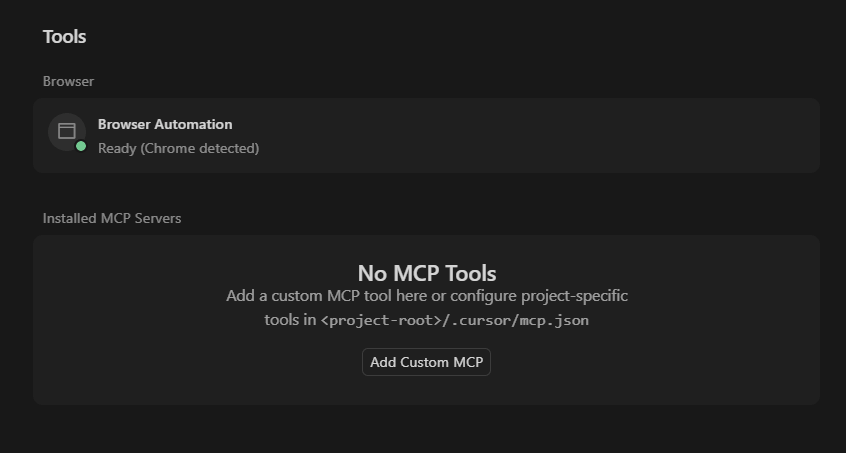
Add settings into mcp.json file
{
  "mcpServers": {
    "youcam-api-mcp": {
      "url": "https://mcp-api-01.makeupar.com/mcp",
      "type": "http",
      "headers": {
        "Authorization": "Bearer YOUR_API_KEY"
      }
    }
  }
}
Navigate to Cursor Settings → Tools & MCP
Enable or Disable the desired tools in 'Installed MCP Servers' section
Copilot in VS Code option 1:
> MCP: Add Server
choose
HTTP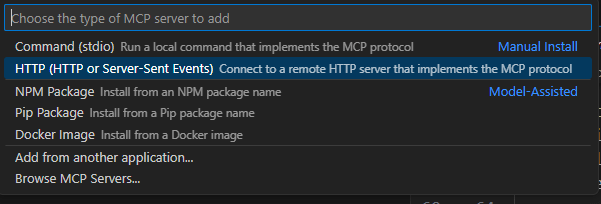
enter the server url
name the mcp server
header setting: fill in the api token
Copilot in VS Code option 2:
> MCP: Open User Configuration
Update the youcam-api-mcp setting to
mcp.json
{
    "servers": {
        "youcam-api-mcp": {
            "url": "https://mcp-api-01.makeupar.com/mcp",
            "type": "http",
            "headers": {
                "Authorization": "Bearer YOUR_API_KEY"
            }
        }
    }
}Settings → Developer → Edit config → open claude_desktop_config.json file
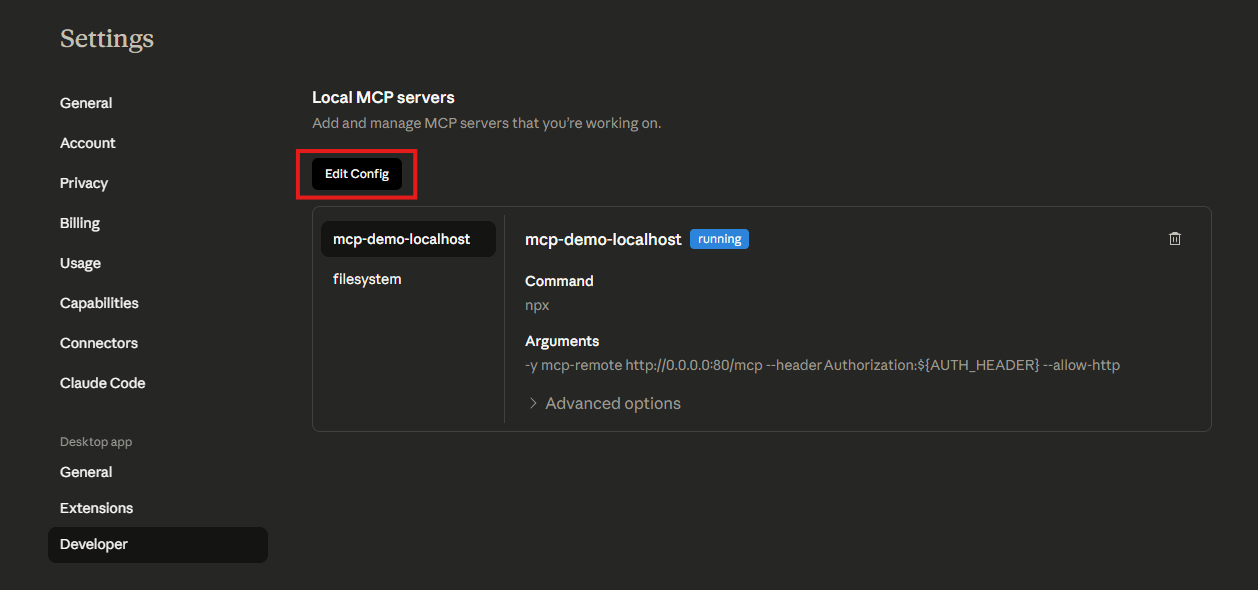
update the
mcpServerssectionreplace the
YOUR_API_KEYpart with your actual api key
{
  "mcpServers": {
    "youcam-api-mcp": {
      "command": "npx",
      "args": [
        "-y",
        "mcp-remote",
        "https://mcp-api-01.makeupar.com/mcp",
        "--header",
        "Authorization:${AUTH_HEADER}"
      ],
      "env": {
        "AUTH_HEADER": "Bearer YOUR_API_KEY"
      }
    }
  }
}- File → Exit to restart claude desktop app
Below is a categorical overview of the APIs available on the youcam-api-mcp server. Each entry indicates whether the operation can be invoked directly or requires a template_id obtained from a dedicated "templates" endpoint.
| API | Execution Type | Brief Description |
|---|---|---|
| AI‑Skin‑Analysis | Direct | Analyses skin texture, pigmentation, hydration, pores, etc., and returns personalized skincare recommendations. |
| AI‑Aging‑Generator | Direct | Generates a series of age-progressed images from a single selfie (youth → older). |
| AI‑Skin‑Tone‑Analysis | Direct | Detects facial skin tone together with eye, eyebrow, lip & hair colours for colour‑matching recommendations. |
| AI‑Face‑Analyzer | Direct | Examines facial geometry (eye shape, nose, cheekbones, etc.) to drive custom beauty or product suggestions. |
| API | Execution Type | Brief Description |
|---|---|---|
| AI‑Makeup‑Virtual‑TryOn | Direct (Pattern‑Based**) | Applies professionally designed makeup virtual try-on; first retrieve available pattern names via AI‑Makeup‑Virtual‑Try‑On‑Pattern‑Name. |
| AI‑Makeup‑Virtual‑Try‑On‑Pattern‑Name | Template/Pattern Query | Returns a list of predefined makeup patterns (pattern_id). |
| AI‑Look‑Vto | Direct (Template‑Based*) | Applies curated “look” styles to an image; retrieve style IDs via AI‑Look‑Virtual‑TryOn‑Templates. |
| AI‑Look‑Virtual‑TryOn‑Templates | Template/Pattern Query | Lists available look templates (template_id). |
* Template‑based APIs require a preceding call to the corresponding “templates” endpoint to obtain an identifier that is then supplied in the execution request.
** The AI Makeup API supports the following effects: SkinSmoothEffect, BlushEffect, BronzerEffect, ConcealerEffect, ContourEffect, EyebrowsEffect, EyelinerEffect, EyeshadowEffect, EyelashesEffect, FoundationEffect, HighlighterEffect, LipColorEffect and LipLinerEffect. Each effect has its own JSON structure. Some include a pattern, others may include a texture, and most contain at least one colour parameter within a palette structure.
It is recommended to copy the sample code for the makeup effect you wish to apply from AI-Makeup-Vto/Inputs-and-Outputs and include the pattern JSON when sending to the LLM. This ensures the LLM understands what AI Makeup supports and what you intend to apply.
For example, a lipstick sample effect is shown below:
{ "category": "lip_color", // string, const "lip_color" "shape": { // object, driven by lipshape.json "name": "original" // string, must match a label from lipshape.json }, "morphology": { // optional object "fullness": 50, // integer, range 0 to 100 (default 0) "wrinkless": 50 // integer, range 0 to 100 (default 0) }, "palettes": [ // minimum items depend on style; often one or more { "color": "#ff0000", // string, hex colour "#RRGGBB" "texture": "matte", // string, enum ["matte","gloss","holographic","metallic","satin","sheer","shimmer"] "colorIntensity": 50, // integer, range 0 to 100 "gloss": 50, // integer, required if texture is gloss, holographic, metallic, sheer or shimmer "shimmerColor": "#ff0000", // string, required if texture is holographic, metallic or shimmer "shimmerIntensity": 50, // integer, required if texture is holographic, metallic or shimmer "shimmerDensity": 50, // integer, required if texture is holographic, metallic or shimmer "shimmerSize": 50, // integer, required if texture is holographic, metallic or shimmer "transparencyIntensity": 50 // integer, required if texture is gloss, sheer or shimmer } ], "style": { "type": "full", // string, enum ["full","ombre","twoTone"] "innerRatio": 50, // integer, required if type is ombre "featherStrength": 50 // integer, required if type is ombre } }
The lipstick pattern JSON can be found in the Full Pattern Catalogue at: https://plugins-media.makeupar.com/wcm-saas/shapes/lipshape.json This is also available in AI-Makeup-Vto/Inputs-and-Outputs within the API documentation.
| API | Execution Type | Brief Description |
|---|---|---|
| AI-Cloth | Direct | Virtual clothing try-on. |
| AI-Cloth-Templates | Template/Pattern Query | Queries predefined clothing templates. |
| AI-Fabric | Direct | Generates or analyses fabrics. |
| AI-Fabric-Templates | Template/Pattern Query | Retrieves fabric templates. |
| AI-Bag | Direct | Virtual bag try-on or placement. |
| AI-Scarf | Direct | Virtual scarf try-on. |
| AI-Shoes | Direct | Virtual shoes try-on. |
| AI-Hat | Direct | Virtual hat try-on. |
| API | Execution Type | Brief Description |
|---|---|---|
| AI-Ring-Virtual-Try-On | Direct | Virtual ring fitting and preview. |
| AI-Bracelet-Virtual-Try-On | Direct | Virtual bracelet try-on. |
| AI-Watch-Virtual-Try-On | Direct | Virtual watch fitting. |
| AI-Earring-Virtual-Try-On | Direct | Virtual earring try-on. |
| AI-Necklace-Virtual-Try-On | Direct | Virtual necklace try-on. |
| API | Execution Type | Brief Description |
|---|---|---|
| AI‑Hairstyle‑Generator | Direct | Generates realistic hairstyles; can also use predefined styles from AI‑Hairstyle‑Generator‑Templates. |
| AI‑Hairstyle‑Generator‑Templates | Template/Pattern Query | Lists hairstyle template IDs. |
| AI‑Hair‑Color | Direct | Changes hair colour with adjustable intensity sliders. |
| AI‑Hair‑Extension | Direct | Simulates extensions of various lengths and styles; requires a template_id from AI‑Hair‑Extension‑Templates. |
| AI‑Hair‑Extension‑Templates | Template/Pattern Query | Provides extension style IDs. |
| AI‑Hair‑Volume‑Generator | Direct | Adds natural volume to fine or thinning hair; optional presets via AI‑Hair‑Volume‑Generator‑Templates. |
| AI‑Hair‑Volume‑Generator‑Templates | Template/Pattern Query | Lists volume‑enhancement template IDs. |
| AI‑Hair‑Bang‑Generator | Direct | Applies realistic bangs; predefined bang styles available via AI‑Hair‑Bang‑Generator‑Templates. |
| AI‑Hair‑Bang‑Generator‑Templates | Template/Pattern Query | Returns bang style IDs. |
| AI‑Wavy‑Hair | Direct | Generates wavy or curly hair effects; preset wave patterns from AI‑Wavy‑Hair‑Templates. |
| AI‑Wavy‑Hair‑Templates | Template/Pattern Query | Lists wavy‑hair template IDs. |
| AI‑Beard‑Style‑Generator | Direct | Simulates a variety of beard styles; additional preset options via AI‑Beard‑Style‑Generator‑Templates. |
| AI‑Beard‑Style‑Generator‑Templates | Template/Pattern Query | Provides beard style IDs. |
| AI‑Hair‑Frizziness‑Detection | Direct | Quantifies hair frizz level from three‑view photos (front, left, right). |
| AI‑Hair‑Length‑Detection | Direct | Measures hair length and categorises it into predefined ranges. |
| AI‑Hair‑Type‑Detection | Direct | Identifies curl pattern, thickness and overall hair type. |
* Template‑based APIs require you to first request the list of available templates, select a template_id, then invoke the main endpoint with that identifier.
| API | Execution Type | Brief Description |
|---|---|---|
| AI-Photo-Lighting | Direct | Enhances or corrects lighting. |
| AI-Photo-Background-Removal | Direct | Removes backgrounds. |
| AI-Object-Removal-Pro | Direct | Advanced object removal. |
| AI-Object-Removal | Direct | Regular object removal. |
| AI-Photo-Enhance | Direct | Improves image quality. |
| AI-Photo-Colorize | Direct | Adds colour to black-and-white images. |
| AI-Photo-Color-Correction | Direct | Adjusts colour balance. |
| AI-Replace | Direct | Replaces selected image regions. |
| AI-Image-Extender | Direct | Extends image borders (outpainting). |
| AI-Headshot-Generator | Direct | Creates headshots. |
| AI-Headshot-Generator-Templates | Template/Pattern Query | Headshot style templates. |
| AI-Studio-Generator | Direct | Generates studio-style portraits. |
| AI-Studio-Generator-Templates | Template/Pattern Query | Studio look templates. |
| AI-Avatar-Generator | Direct | Generates avatars. |
| AI-Avatar-Generator-Templates | Template/Pattern Query | Avatar style templates. |
| AI-Makeup-Transfer | Direct | Transfers makeup between faces. |
| AI-Face-Swap | Direct | Swaps faces in photos. |
| AI-Face-Swap-Face-Detection | Direct | Detects faces specifically for swapping. |
| API | Execution Type | Brief Description |
|---|---|---|
| AI-Video-Enhance | Direct | Enhances video quality. |
| AI-Face-Swap-Video | Direct | Swaps faces in video. |
| AI-Style-Transfer-Video | Direct | Applies artistic style to video. |
| AI-Style-Transfer-Video-Templates | Template/Pattern Query | Queries built-in video style templates. |
| API | Execution Type | Brief Description |
|---|---|---|
| Get‑Running‑Task‑Status | Direct | Checks the status and results of a previously started asynchronous task using its task_id. This endpoint is used internally by MCP‑aware clients for polling; developers typically do not call it directly. |
All AI APIs run asynchronously:
- The initial request returns a
task_id. - The client automatically polls
Get-Running-Task-Statusuntil the task reaches a terminal state (completed,failed).
It is useful to retrieve a result within the retention period once it has completed and the polling has timed out.