Webhooks allow your application to receive asynchronous notifications when an AI task completes with either a success or error status. Notifications are sent to an HTTP endpoint you control and follow the Standard Webhooks Specification.
We use HMAC-SHA256 signature schme webhook secret, and webhook secret is base64 encoded, prefixed with whsec_ for easy identification.
Example webhook secret:
whsec_NDQzMzYxNzkzMzE0NjYyNDM6OTIxOTcwNDIxODQ
We strongly recommend using an official implementation of the Standard Webhooks Library, and you do not have to worry about the signature validation details.
Using an official implementation also ensures secure and correct signature validation.
Please carefully understand the construction of the webhook secret, refer to Symmetric part of Signature scheme.
When you are trying to sign signature input, please remove the whsec_ prefix and base64 decode the remaining string to obtain the actual bytes of secret to do HMAC-SHA256 hash.
POST https://yourdomain.com/webhook-endpoint
Content-Type: application/json
webhook-id: msg_1eWPv9cWJCnEP99UJncmVJ6KjK_xVXRhZPe_eSGnRNbLlXEPjiG3gb3Usg9le3_4:1761112848
webhook-timestamp: 1761112900
webhook-signature: v1,vyVNWrjoZcBK1JXrFGkdDKK2slo5+Q5yfzpkHmqO5R0=
{
"created_at": 1761112848,
"data": {
"task_id": "1eWPv9cWJCnEP99UJncmVJ6KjK_xVXRhZPe_eSGnRNbLlXEPjiG3gb3Usg9le3_4",
"task_status": "success"
}
}A unique identifier for the webhook delivery. This value remains consistent across retries and should be used for idempotency handling.
The Unix epoch timestamp (seconds) when the webhook was sent.
'v1' followed by a comma (,), followed by the base64 encoded HMAC-SHA256 signature.
'v1' indicates the version of the signature scheme, and is currently the only supported version.
The base64 encoded HMAC-SHA256 signature is the result of signing signature input using your webhook secret.
Signature input format:
{webhook-id}.{webhook-timestamp}.{raw-minified-json-body}Example signed content:
msg_1eWPv9cWJCnEP99UJncmVJ6KjK_xVXRhZPe_eSGnRNbLlXEPjiG3gb3Usg9le3_4:1761112848.1761112900.{"created_at":1761112848,"data":{"task_id":"1eWPv9cWJCnEP99UJncmVJ6KjK_xVXRhZPe_eSGnRNbLlXEPjiG3gb3Usg9le3_4","task_status":"success"}}Unix epoch timestamp (seconds) indicating when the task completed.
Contains the event payload.
| Field | Description |
|---|---|
task_id | The task identifier returned when the task was created. Use this ID to query the final task result. |
task_status | Task completion status. Possible values: success, error. |
Prepare a webhook endpoint on your server. Ensure the endpoint accepts
POSTrequests and is accessible via HTTPS.Create a webhook in the API Console.
Run an AI task and record the
task_id.Process webhook notifications using the
task_idto retrieve task results.
Visit the API Console's Webhook Management page:
https://yce.makeupar.com/api-console/en/webhook/

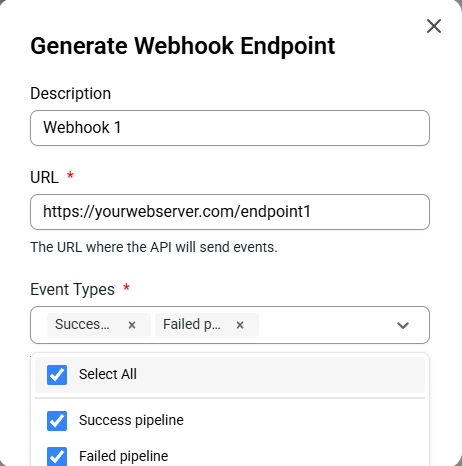
You may configure up to 10 webhook endpoints concurrently.
Your webhook secret is used to validate the webhook-signature. Keep it safe and never expose it publicly.

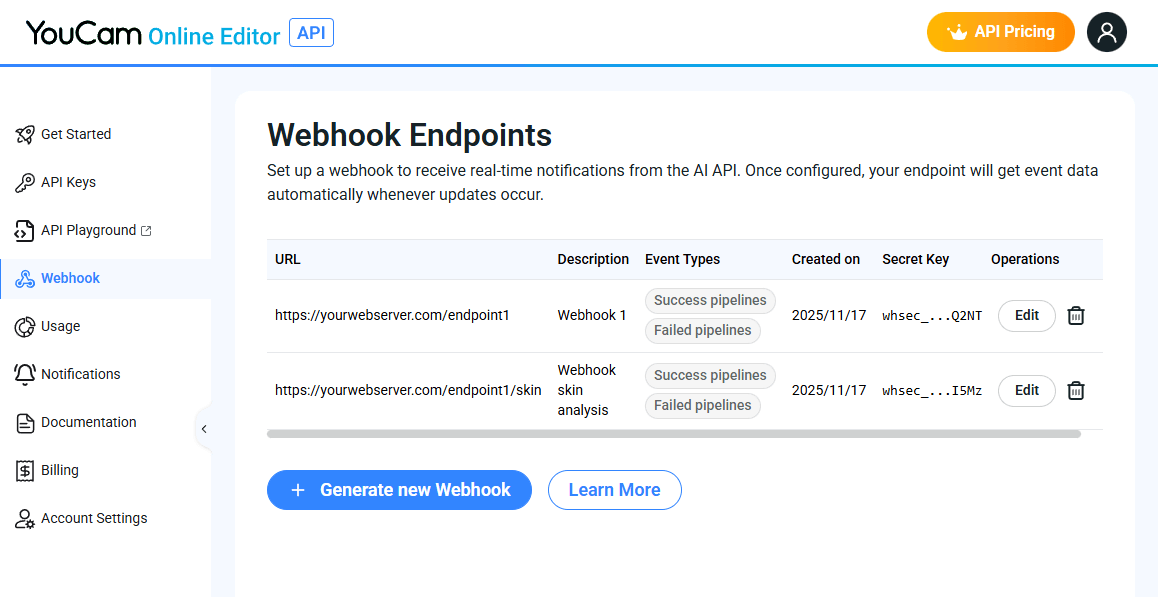
We recommend using an official implementation of the Standard Webhooks Library:
This ensures secure and correct signature validation.
You can also test or debug payloads using the Standard Webhooks Simulator:
https://www.standardwebhooks.com/simulate
Consider the webhook request example:
POST https://yourdomain.com/webhook-endpoint
Content-Type: application/json
webhook-id: msg_1eWPv9cWJCnEP99UJncmVJ6KjK_xVXRhZPe_eSGnRNbLlXEPjiG3gb3Usg9le3_4:1761112848
webhook-timestamp: 1761112900
webhook-signature: v1,vyVNWrjoZcBK1JXrFGkdDKK2slo5+Q5yfzpkHmqO5R0=Request body:
{
  "created_at": 1761112848,
  "data": {
    "task_id": "1eWPv9cWJCnEP99UJncmVJ6KjK_xVXRhZPe_eSGnRNbLlXEPjiG3gb3Usg9le3_4",
    "task_status": "success"
  }
}Signature input format will be like:
{webhook-id}.{webhook-timestamp}.{raw-minified-json-body}Example signed content:
msg_1eWPv9cWJCnEP99UJncmVJ6KjK_xVXRhZPe_eSGnRNbLlXEPjiG3gb3Usg9le3_4:1761112848.1761112900.{"created_at":1761112848,"data":{"task_id":"1eWPv9cWJCnEP99UJncmVJ6KjK_xVXRhZPe_eSGnRNbLlXEPjiG3gb3Usg9le3_4","task_status":"success"}}Veriry HMAC-SHA256 encrypted signed content using your webhook secret key with the received webhook-signature. Example:
v1,vyVNWrjoZcBK1JXrFGkdDKK2slo5+Q5yfzpkHmqO5R0=