AI Bag Virtual Try-On
AR makes luxury bag shopping a tangible experience! AR tech empowers brands to showcase handbags with unmatched realism. From strap length to bag pairing, customers can visualize products instantly through camera.
This guide walks you through:
- Endpoint:
/s2s/v2.0/task/bag - Authentication: All requests require an
Authorization: Bearer YOUR_API_KEY - Workflow:
- Prepare a selfie image: Uploading an image or providing a valid image URL of yourself as the virtual try-on target.
- Prepare a bag image: Uploading an image or providing a valid image URL of a bag product or a person carrying a bag without any obstruction.
- Select a style and a gender: Select a preferred style and the gender you wish to visualize.
- Fire an AI task and Retrieve Task ID: Capture the
task_idfrom the response. - Poll Status (
GET): Use thetask_idto check the status of the task. Continue polling untiltask_statusis"success"or"error".
- Authentication
- Include your API key in the request header using Bearer Token:
Authorization: Bearer YOUR_API_KEYYou can find your API Key at https://yce.makeupar.com/api-console/en/api-keys/.
- AI Bag API Usage Guide
This guide explains how to upload images, prepare reference bags, and create virtual try-on tasks using the AI Bag API.
- Step 1. Upload a File Using the File API
Use the File API (/s2s/v2.0/file) to upload a target user image.
Image Requirements:
- Upload a selfie photo.
- Ensure the photo clearly shows the upper body.
- Avoid backgrounds with multiple people or distracting objects.
Example Request:
curl --request POST \
  --url https://yce-api-01.makeupar.com/s2s/v2.0/file \
  --header 'Authorization: Bearer YOUR_API_KEY' \
  --header 'content-type: application/json' \
  --data '{
    "files": [
      {
        "content_type": "image/jpg",
        "file_name": "selfie_photo_01_3dbd1b6683.jpg",
        "file_size": 547541
      }
    ]
}'- Step 2. Retrieve File API Response
The response includes:
file_idfor creating an AI task.requests.urlfor uploading the actual image file.
Sample Response:
{
  "status": 200,
  "data": {
    "files": [
      {
        "content_type": "image/jpg",
        "file_name": "selfie_photo_01_3dbd1b6683.jpg",
        "file_id": "SaGaqpDgKwFrVBgMpQMA3HY0LeqdT9/13W5TOD8/u/FfjK3xgCQ+hRt9MJXBFaud",
        "requests": [
          {
            "method": "PUT",
            "url": "https://yce-us.s3-accelerate.amazonaws.com/demo/ttl30/...signature...",
            "headers": {
              "Content-Length": "547541",
              "Content-Type": "image/jpg"
            }
          }
        ]
      }
    ]
  }
}- Step 3. Upload Image to Provided URL
Use the requests.url from the File API response to upload the image:
curl --location --request PUT 'https://yce-us.s3-accelerate.amazonaws.com/demo/ttl30/...signature...' \
  --header 'Content-Type: image/jpg' \
  --header 'Content-Length: 547541' \
--data-binary @'./selfie_photo_01_3dbd1b6683.jpg'- Step 4. Prepare a Reference Bag Image
You can:
- Upload a bag image using the File API (
/s2s/v2.0/file), or - Provide a valid image URL.
Supported Bag Images:
- Product image of the bag.
- A person carrying a bag without any obstruction as a bag reference.
Refer to File Specs and Errors for detailed specifications.
- Step 5. Create an AI Task
Select a preferred style and the gender you wish to visualize. Use the AI Task API (/s2s/v2.0/task/bag) to create a virtual try-on task.
Parameters:
- For the user image:
src_file_idorsrc_file_url. - For the bag image:
ref_file_id, orref_file_url.
Example Request:
curl --request POST \
  --url https://yce-api-01.makeupar.com/s2s/v2.0/task/bag \
  --header 'Authorization: Bearer YOUR_API_KEY' \
  --header 'content-type: application/json' \
  --data '{
    "src_file_url": "https://example.com/selfie.jpg",
    "ref_file_url": "https://example.com/accessory.jpg",
    "gender": "female",
    "style": "random"
}'
Sample Response:
{
  "status": 200,
  "data": {
    "task_id": "SaGaqpDgKwFrVBgMpQMA3HY0LeqdT9_13W5TOD8_u_GPi6NqQ3dhlmN-6ntFwhzT"
  }
}- Step 6. Poll for Task Result
Use the task ID to check the status:
curl --request GET \
  --url https://yce-api-01.makeupar.com/s2s/v2.0/task/bag/SaGaqpDgKwFrVBgMpQMA3HY0LeqdT9_13W5TOD8_u_GPi6NqQ3dhlmN-6ntFwhzT \
  --header 'Authorization: Bearer YOUR_API_KEY' \
--header 'content-type: application/json'- Step 7. Retrieve Result
A successful response includes a download URL for the result image:
{
  "status": 200,
  "data": {
    "error": null,
    "results": {
      "url": "https://yce-us.s3-accelerate.amazonaws.com/demo/ttl30/...signature..."
    },
    "task_status": "success"
  }
}
Invalid API Key error response:
{
  "status": 401,
  "error": "Unauthorized",
  "error_code": "InvalidAccessToken"
}- AI Bag Virtual Try-On Specification
Supported Bag Image
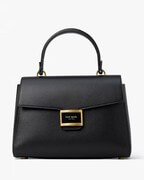
- Product Image Requirements
- Minimum resolution: 512 × 512 pixels
- Only one product per image
- The product should cover more than 25 per cent of the image height
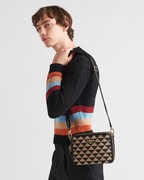
- Worn Image Requirements
- Minimum resolution: 800 × 800 pixels
Supported Selfie View
- Recommended image resolution: at least 512 × 512 pixels.
- Recommended face coverage: more than 15 per cent of the image height.
- The image must clearly show a single human subject with the face fully visible and at least a head shot included in the frame, from head to chest. A half-body shot is preferred.

Try-on Styles
- There are four predefined styles for generating the virtual try-on output: "style_parisian_chic", "style_urban_chic", "style_mediterranean_chic" and "style_art_deco_style". You can specify this style parameter when creating an AI task or allow the system to randomly select a style by default.

- Supported Formats & Dimensions
| AI Feature | Supported Dimensions | Supported File Size | Supported Formats |
|---|---|---|---|
| AI Bag Virtual Try-On | Input: long side <= 4096 Output: 1104 x 1472 | < 10MB | jpg/jpeg/png/heic |
- Error Codes
| Error Code | Description |
|---|---|
| error_download_image | Download srcKeys/refKeys error |
| error_inference | Inference pipeline error |
| error_no_face | No face detected in source image |
| error_nsfw_content_detected | NSFW content detected in result image |
| exceed_max_filesize | Input file size exceeds the maximum limit (10 MB) |
| invalid_parameter | Invalid gender option value Invalid style option value |
| unknown_internal_error | Others |
- Environment & Dependency
| Sample Code Language / Tool | Recommended Runtime Versions |
|---|---|
| cURL | - bash >= 3.2 - curl >= 7.58 (modern TLS/HTTP support) - jq >= 1.6 (robust JSON parsing) |
| Node.js (JavaScript) | Node >= 18 (for global fetch) |
| JavaScript | - Chrome / Edge >= 80 - Firefox >= 74 - Safari >= 13.1 |
| PHP | PHP >= 7.4 (for modern TLS/compat), ext-curl (recommended) or allow_url_fopen=On + ext-openssl, ext-json |
| Python | Python >= 3.10 (for f-strings), requests >= 2.20.0 |
| Java | Java 11+ (for HttpClient), Jackson Databind >= 2.12.0 |