AI Fitzpatrick Skin Type Analysis
AI Fitzpatrick Skin Type Analysis
Integrate AI driven Fitzpatrick skin type detection into your applications to classify skin types accurately using camera input. This API enables developers to build personalized skincare, sunscreen, and product recommendation workflows for eCommerce and digital health platforms.
Skin Type Detection
The API uses computer vision and machine learning models to analyze skin characteristics and return a Fitzpatrick classification in a single request. It provides structured, objective data that can be directly consumed by frontend applications, recommendation engines, or clinical systems.
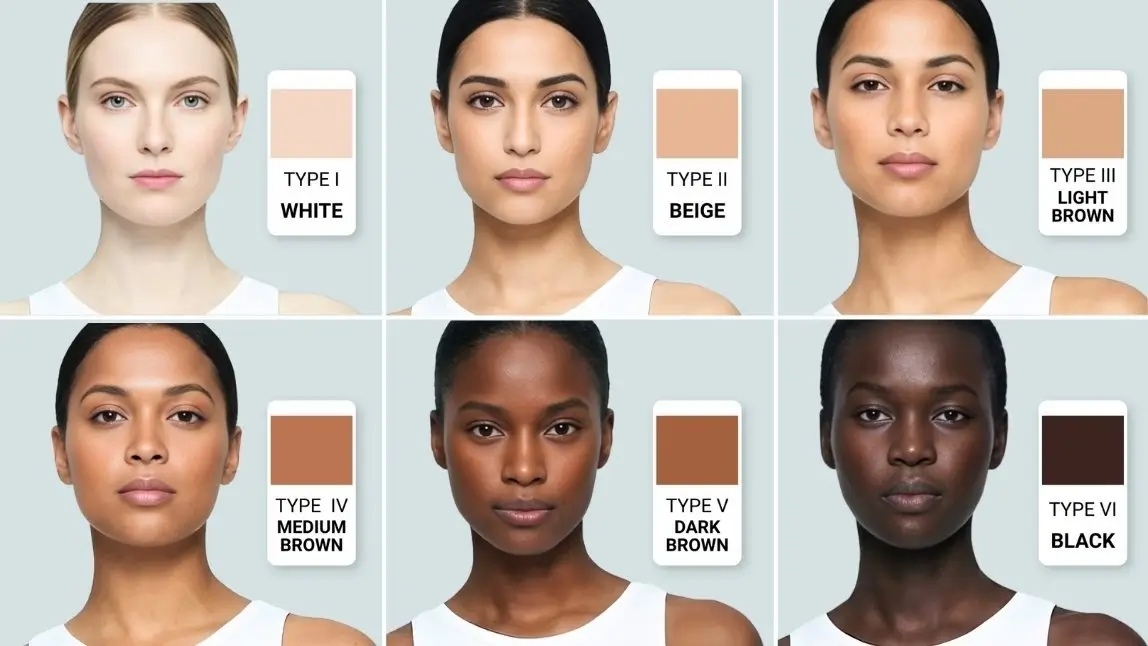
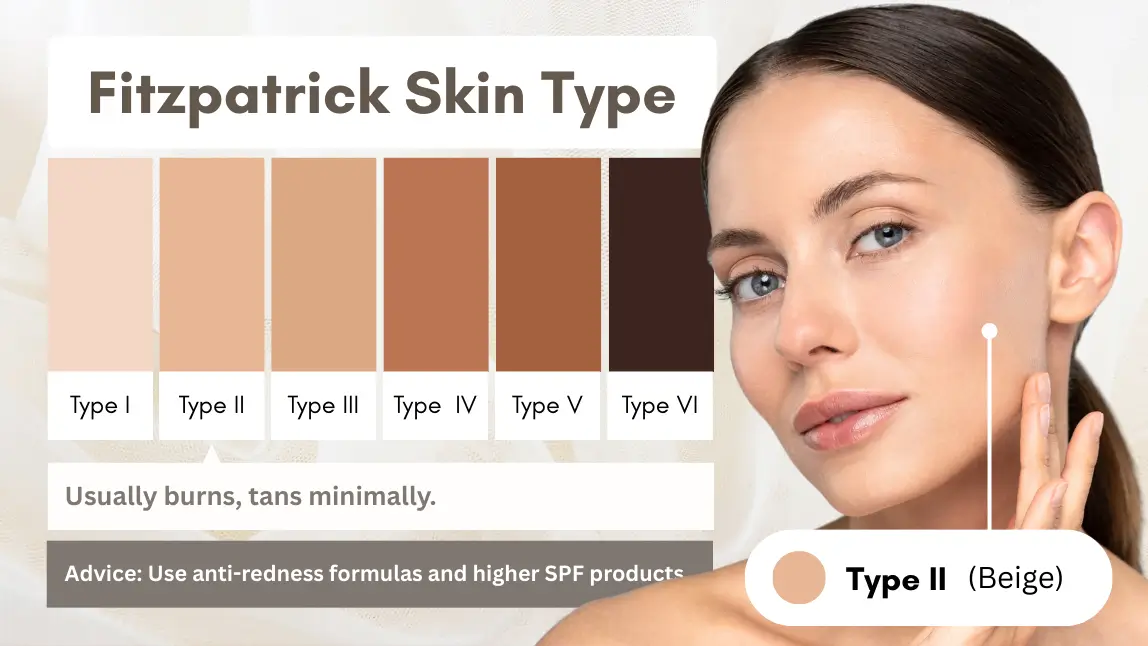
The Fitzpatrick Scale, introduced by Dr. Thomas B. Fitzpatrick, defines six skin types based on melanin levels and response to UV exposure, allowing systems to predict tendencies to burn or tan.
Classification Output
The API returns one of six standardized skin types from Type I to Type VI based on UV response modeling.
This output enables developers to deliver tailored product recommendations, automate skincare workflows, and enhance personalization logic across user experiences while maintaining consistency and scalability.
| Fitzpatrick Scale | Skin Type | Skin Reaction to Sun |
|---|---|---|
| Type I | White | Almost always burns, never tans |
| Type II | Beige | Usually burns, tans minimally |
| Type III | Light Brown | Sometimes burns, gradually tans |
| Type V | Medium Brown | Rarely burns, tans easily |
| Type V | Dark Brown | Very rarely burns |
| Type VI | Very Dark Brown | Almost never burns |

1. Capture Image Capture a front facing image with adequate lighting. Ensure the face is clearly visible and occupies a sufficient portion of the frame.
2. Upload Image Request upload URLs and file IDs via:
POST /s2s/v2.0/fileUpload the image using the returned URL. Alternatively, provide a publicly accessible image URL hosted on your own storage.
3. Optional Preprocessing
POST /s2s/v2.0/task/fitzpatrick-scale-analyzer/pre-processUse this step when the image contains multiple faces or when explicit target selection is required. For single face images, this step can be skipped if default indexing is sufficient.
4. Retrieve Preprocess Result
GET /s2s/v2.0/task/fitzpatrick-scale-analyzer/pre-processConfigure a webhook or implement polling to retrieve task results. With webhooks, your application receives automatic notifications when the task is completed. With polling, your system repeatedly calls the task endpoint until the status changes from running to success or error.
5. Execute Analysis Task
POST /s2s/v2.0/task/fitzpatrick-scale-analyzerSubmit the task using file IDs or image URLs as input. The response returns a task_id for tracking and retrieving the result.
6. Retrieve Task Result
GET /s2s/v2.0/task/fitzpatrick-scale-analyzer/{task_id}Use the task ID to track status and obtain results.
Webhooks can be configured to receive asynchronous notifications on task completion with a success or error status. Polling is also supported by repeatedly calling the task endpoint until the status is updated from running to success or error.
Usage is only charged when the task completes successfully.
- Supported Formats & Dimensions
| AI Feature | Supported Dimensions | Supported File Size | Supported Formats |
|---|---|---|---|
| AI Fitzpatrick Skin Type Analysis | The length of the longer side shall not exceed 4096 pixels, and the length of the shorter side shall be no less than 320 pixels. | < 10MB | jpg/jpeg |
- Error Codes
| Error Code | Description |
|---|---|
| error_below_min_image_size | Source image dimensions must be at least 320 pixels. |
| error_face_position_invalid | Your face needs to be fully visible in the image, without any parts cut off |
| error_face_position_too_small | The face in your photo is too small to analyze properly |
| error_face_position_out_of_boundary | Your face is either too large or partially outside the edges of the photo |
| error_insufficient_lighting | The lighting is too dim, which makes analysis difficult |
| error_face_angle_invalid | Your face angle isn't quite right. For front-facing shots, keep your head within 10 degrees of straight. For side-facing shots, the angle should be more than 15 degrees |
- Environment & Dependency
| Sample Code Language / Tool | Recommended Runtime Versions |
|---|---|
| cURL | - bash >= 3.2 - curl >= 7.58 (modern TLS/HTTP support) - jq >= 1.6 (robust JSON parsing) |
| Node.js (JavaScript) | Node >= 18 (for global fetch) |
| JavaScript | - Chrome / Edge >= 80 - Firefox >= 74 - Safari >= 13.1 |
| PHP | PHP >= 7.4 (for modern TLS/compat), ext-curl (recommended) or allow_url_fopen=On + ext-openssl, ext-json |
| Python | Python >= 3.10 (for f-strings), requests >= 2.20.0 |
| Java | Java 11+ (for HttpClient), Jackson Databind >= 2.12.0 |