AI Face Attributes & Ratio Analyzer
The AI Face Attributes & Ratio Analyzer examines face structure, identifying features like face, eye, eyebrow, lip, nose, cheekbone shapes, designed to provide personalized recommendations.
How to Take Photos for AI Face Attributes & Ratio Analyzer
Take a selfie facing forward
- Just one clear photo, looking straight into the camera. It is best to let your hair fall naturally, with your entire face visible and nothing covering it. Brush your hair back to reveal your forehead, and make sure you are looking directly ahead to capture a proper front view.
- Instead, use the JS Camera Kit to take the photo. Follow the automatic face alignment, lighting guidance, and face size detection to ensure the photo meets the required standards for processing.
How to Detect Skin Concerns by AI
Resize your source image
Resize your photo to fit the supported dimensions. See details in File Specs & ErrorsUpload file using the File API
Using the /s2s/v2.0/file API to upload a target user image.Image Requirements
- See details in File Specs & Errors.
Important: Simply calling the File API does not upload your file. You must manually upload the file to the URL provided in the File API response. That URL is your upload destination, make sure the file is successfully transferred there before proceeding.
Before calling the AI API, ensure your file has been successfully uploaded. Use the File API to retrieve an upload URL, then upload your file to that location. Once the upload is complete, you'll receive a file_id in the response, this ID is what you'll use to access AI features related to that file.Warning: Please note that, you will get an 500 Server Error / unknown_internal_error or 404 Not Found error when using AI APIs if you do not upload the file to the URL provided in the File API response.
Run an AI Face Attributes & Ratio Analyzer task
Once the upload is complete, you can select multiple face attributes to analyze using your file ID. Please refer to the Inputs & Outputs.
Subsequently, calling POST 'task/face-attr-analysis' with the File ID executes the enhance task and obtains a task_id.Polling to check the status of a task until it succeed or error
This task_id is used to monitor the task's status through polling GET 'task/face-attr-analysis' to retrieve the current engine status. Until the engine completes the task, the status will remain 'running', and no units will be consumed during this stage.Warning: Please note that, Polling to check the status of a task based on it's retention period is mandotary. A task will be timed out if there is no polling request within the retention period, even if the task is processed succefully(Your unit(s) will be consumed).
Warning: You will get a InvalidTaskId error once you check the status of a timed out task. So, once you run an AI task, you need to polling to check the status within the retention period until the status become either success or error.
Get the result of an AI task once success
The task will change to the 'success' status after the engine successfully processes your input file and generates the resulting image. You will get an url of the processed image and a dst_id that allow you to chain another AI task without re-upload the result image. Your units will only be consumed in this case. If the engine fails to process the task, the task's status will change to 'error' and no unit will be consumed.
When deducting units, the system will prioritize those nearing expiration. If the expiration date is the same, it will deduct the units obtained on the earliest date.
- Real-world examples:

- Face Attributes:

| Category | Subcategory | Request Parameter | Result Parameter | Result Types |
|---|---|---|---|---|
| FACE | Face Shape | faceShape | faceshape | Triangle, Diamond, Heart, InvTriangle, Oblong, Oval, Round, Square, Unknown |
| AGE & GENDER | Age | age | agegender.age | integer |
| Gender | gender | agegender.gender | female, male, unknown | |
| EYES | Eye Shape | eyeShape | eyelid.left_shape, eyelid.right_shape | Narrow, Round, Almond |
| Eye Size | eyeSize | eyelid.size | Big, Small, Average | |
| Eye Angle | eyeAngle | eyelid.left_angle, eyelid.right_angle | Downturned, Upturned, Average | |
| Eye Distance | eyeDistance | eyelid.setting | Close-set, Wide-Set, Average | |
| Eyelid | eyelid | eyelid.left_eyelid, eyelid.right_eyelid | Hooded-lid, Single-lid, Double-lid, Deep-Set | |
| BROWS | Eyebrow Shape | eyebrowShape | eyebrow.left_shape, eyebrow.right_shape | Hard Angled, Soft Angled, Straight, Rounded, Obscured |
| Eyebrow Thickness | eyebrowThickness | eyebrow.left_body_thickness, eyebrow.right_body_thickness | Dense, Sparse, Average, Unknown | |
| Eyebrow Distance | eyebrowDistance | eyebrow.gap | Far-Apart, Close, Average | |
| Eyebrow Shortness | eyebrowShortness | eyebrow.left_shortness, eyebrow.right_shortness | Short, Normal | |
| LIPS | Lip Shape | lipShape | lipshape[] | Bow, Downturned, Full, Heavy Lower Lip, Heavy Upper Lip, Narrow, Round, Thin, Wide, Average |
| NOSE | Nose Width | noseWidth | nose.width | Narrow, Broad, Average |
| Nose Length | noseLength | nose.length | Long, Short, Average | |
| CHEEKBONES | Cheekbones | cheekbones | cheekbone.left, cheekbone.right, cheekbone.overall | Flat Cheekbone, High Cheekbone, Low Cheekbone, Round Cheeks |
- Face Ratios:

| Subcategory | Request Parameter | Result Parameter | Result Types | Description |
|---|---|---|---|---|
| Horizontal Third Ratio | horizontalThird | horizontal_third | Three-section percentages; Interpretation: Short / Balanced / Long; Golden Ratio: 33% : 33% : 33% | The Face Horizontal Ratio is based on dividing the face into three equal sections: from the hairline to the bottom of the eyebrows, from the bottom of eyebrows to the bottom of the nose, and from the bottom of the nose to the tip of the chin. The golden ratio, or ideal proportion, between the three is 1:1:1. |
| Vertical Fifth Ratio | verticalFifth | vertical_fifth | Five-section percentages; Interpretation (Eye Distance & Eye Width): Narrow / Balanced / Wide; Golden Ratio: 20% : 20% : 20% : 20% : 20% | The Face Vertical Ratio is determined by dividing the face into five sections: the width of one eye, the distance between the eyes, and the space between the outer corners of the eyes to the edges of the face. The golden ration for these proportions is 1:1:1:1:1. |
| Face Aspect Ratio | faceAspectRatio | face_aspect_ratio | [1, r]; Interpretation: Short / Balanced / Long; Golden Ratio: 1 : 1.46 | The Face Aspect Ratio is the relationship between the width of the face and its height, ideally following the golden ratio of 1:1.46, thus creating a balanced and aesthetically pleasing appearance. |
| Eye Aspect Ratio | eyeAspectRatio | left_eye_aspect_ratio right_eye_aspect_ratio | [1, r]; Interpretation: Round / Balanced / Flat; Golden Ratio: 1 : 3 | The Eye Aspect Ratio is the relationship between the height of the eye compared to its width, ideally aligning with the golden ratio of 1:3, ensuring the most aesthetically balanced look. |
| Eyebrow Arch Ratio | eyebrowArch | left_eyebrow_arch_to_eyebrow_width right_eyebrow_arch_to_eyebrow_width | [1, r]; Interpretation: Short Arch / Balanced / Long Arch; Golden Ratio: 1 : 1.618 | The ideal proportion of the Eyebrow Arch is determined by the shape of the eyebrow itself, where the highest point (the arch) aligns with the golden ratio for an aesthetically pleasing look. |
| Eye Height to Eyebrow Distance | eyeHeightToEyebrowDistance | left_eye_height_to_eyebrow_distance right_eye_height_to_eyebrow_distance overall_eye_height_to_eyebrow_distance | [1, r]; Interpretation: Short / Balanced / Long; Golden Ratio: 1 : 1.618 | The Eye to Eyebrow Distance is the vertical distance from the top of the upper eyelid to the highest point of the eyebrow. Ideally, it would follow the golden ratio of 1.618:1 when compared to the eye height, for the most harmonious balance between the eyes and the brows. |
| Nose Aspect Ratio | noseAspectRatio | nose_aspect_ratio | [1, r]; Interpretation: Wide / Balanced / Narrow; Golden Ratio: 1 : 1.618 | The Nose Aspect Ratio is the relationship between the width of the nose and its height, ideally following the golden ratio of 1:1.618. |
| Nose Width to Mouth Width | noseWidthToMouthWidth | nose_width_to_mouth_width | [1, r]; Interpretation: Small / Balanced / Large; Golden Ratio: 1 : 1.618 | The Nose Width to Mouth Width ratio is the relationship between the width of the nose and that of the mouth, ideally following the golden ratio of 1:1.618, creating a balanced and aesthetically pleasing appearance. |
| Nose to Lip to Chin | noseToLipToChin | nose_to_lip_to_chin | [1, r]; Interpretation: Short / Balanced / Long (lower face length); Golden Ratio: 1 : 1.618 | The Nose to Lip to Chin ratio is a proportion where the distance from the base of the nose to the center of the lip is 1, and the ideal distance from the center of the lip to the chin is 1.618. This golden ratio creates a balanced and harmonious lower face, following the principles of facial symmetry. |
| Upper Lip to Lower Lip | upperLipToLowerLip | upper_lip_to_lower_lip | [1, r]; Interpretation: Full Upper / Balanced / Full Lower; Golden Ratio: 1 : 1.618 | The golden ratio of the Upper Lip to the Lower Lip suggests that the thickness of the lower lip should be 1.618 times that of the upper lip. This proportion creates a balanced and aesthetically pleasing look, with the lower lip being slightly fuller than the upper lip. |
- Suggestions for How to Shoot:
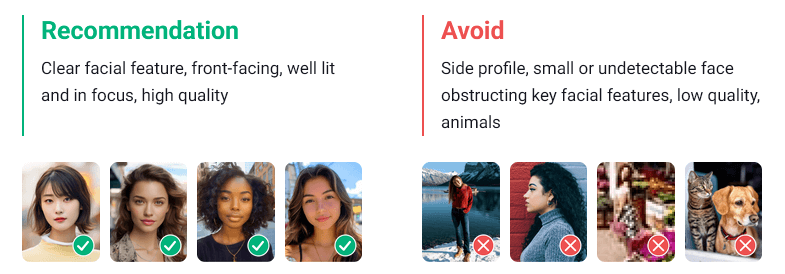
Warning: The width of the face needs to be greater than 60% of the width of the image.
- Supported Formats & Dimensions
| AI Feature | Supported Dimensions | Supported File Size | Supported Formats |
|---|---|---|---|
| AI Face Attributes & Ratio Analyzer | long side <= 4096, single person only. Images with a side longer than 1080px are automatically resized for analysis. | < 10MB | jpg/jpeg/png |
- Error Codes
| Error Code | Description |
|---|---|
| error_below_min_image_size | Source image dimensions must be at least 320 pixels. |
| error_face_position_invalid | Face must be fully visible, forward-facing, and centered in the image. |
| error_face_position_too_small | Detected face is too small for analysis. |
| error_face_position_out_of_boundary | Face extends beyond image boundaries. |
| error_face_not_forward_facing | Face must be directly facing the camera. |
| error_face_angle_upward | Face is angled too far upward—slightly tilt head down. |
| error_face_angle_downward | Face is angled too far downward — slightly tilt head up. |
| error_face_angle_leftward | Face is turned too far left — slightly rotate head right. |
| error_face_angle_rightward | Face is turned too far right — slightly rotate head left. |
| error_face_angle_left_tilt | Face is tilted too far left — gently tilt head right. |
| error_face_angle_right_tilt | Face is tilted too far right — gently tilt head left. |
- Environment & Dependency
| Sample Code Language / Tool | Recommended Runtime Versions |
|---|---|
| cURL | - bash >= 3.2 - curl >= 7.58 (modern TLS/HTTP support) - jq >= 1.6 (robust JSON parsing) |
| Node.js (JavaScript) | Node >= 18 (for global fetch) |
| JavaScript | - Chrome / Edge >= 80 - Firefox >= 74 - Safari >= 13.1 |
| PHP | PHP >= 7.4 (for modern TLS/compat), ext-curl (recommended) or allow_url_fopen=On + ext-openssl, ext-json |
| Python | Python >= 3.10 (for f-strings), requests >= 2.20.0 |
| Java | Java 11+ (for HttpClient), Jackson Databind >= 2.12.0 |
version: v2.5The JavaScript Camera Kit provides a complete in-browser camera solution designed for high-accuracy face-based imaging tasks. It handles camera permissions, real-time face detection, automatic quality validation (lighting, pose, angle, distance), and guided capture UI flows.
This module is optimized for AI-driven image analysis, such as:
- AI Skin Analysis (SD/HD)
- AI Face Tone Analysis
- Hair-related Analysis
- Virtual Try-On (Ring, Wrist, Necklace, etc.)
- Permission Handling: Automatic management of webcam access.
- Quality Validation: Real-time monitoring of face position, lighting, and angle.
- Multi-Step Flows: Support for complex capture requirements (e.g., multi-angle hair capture).
- Flexible Output: Supports both
base64andblobimage formats.
Include the SDK via CDN in your HTML <head> or before the closing <body> tag. Once loaded, the SDK installs a global YMK object.
<script src="https://plugins-media.makeupar.com/v2.5-camera-kit/sdk.js"></script>The following example demonstrates how to initialize the kit, open the camera, and handle captured images.
<!DOCTYPE html>
<html lang="en">
  <head>
    <meta charset="UTF-8" />
    <meta name="viewport" content="width=device-width, initial-scale=1.0" />
    <title>Camera Kit Sample</title>
    <style>
      #YMK-module { margin: 20px 0; }
      img { width: 150px; margin: 5px; border: 1px solid #ccc; }
    </style>
  </head>
  <body>

    <!-- Initialization Script -->
    <script>
      // Define async init entry point
      window.YMKAsyncInit = function() {
        YMK.addEventListener('loaded', function() {
          console.log('Module fully loaded and ready');
        });

        YMK.addEventListener('faceDetectionCaptured', function(capturedResult) {
          const container = document.getElementById('captured-results');
          container.innerHTML = '';

          // Handle multiple images if returned (e.g., multi-angle capture)
          for (const item of capturedResult.images) {
            const img = document.createElement('img');
            // Handle both base64 strings and Blob objects
            img.src = typeof item.image === 'string'
              ? item.image
              : URL.createObjectURL(item.image);
            container.appendChild(img);
          }
        });
      };

      function openCameraKit() {
        YMK.init({
          faceDetectionMode: 'makeup',
          imageFormat: 'base64',
          language: 'enu'
        });
        YMK.openCameraKit();
      }
    </script>

    <!-- Load SDK -->
    <script src="https://plugins-media.makeupar.com/v2.5-camera-kit/sdk.js"></script>

    <!-- UI Elements -->
    <button onclick="openCameraKit()">Open Camera Kit</button>

    <!-- Mandatory Mount Point -->
    <div id="YMK-module"></div>

    <h3>Captured Results:</h3>
    <div id="captured-results"></div>
  </body>
</html>To ensure successful integration, the following requirements must be met:
| Requirement | Description |
|---|---|
| Browser Support | Must support getUserMedia API. |
| HTTPS | Required on most browsers for webcam access (except localhost). |
| Mount Point | A <div id="YMK-module"></div> is mandatory for rendering the UI. |
| Async Init | You must define window.YMKAsyncInit before the SDK loads. |
Call YMK.init() before calling YMK.openCameraKit().
YMK.init({
  faceDetectionMode: 'makeup', // Detection flow
  imageFormat: 'base64',       // Output format
  language: 'enu'              // UI Language
});Register listeners for camera events and capture results.
YMK.addEventListener('faceQualityChanged', function(q) {
  console.log('Quality updated:', q);
});This displays the UI, opens the webcam, and begins real-time monitoring.
YMK.openCameraKit();Images arrive via the faceDetectionCaptured event.
YMK.addEventListener('faceDetectionCaptured', function(result) {
  console.log(result.images);
});Clean up resources when done.
YMK.close();Configures module appearance, detection mode, language, and capture format.
| Argument | Type | Description | Default |
|---|---|---|---|
faceDetectionMode | string | Detection flow to use (see Detection Modes below). | "skincare" |
width | number | Pixel width of module container (300–1920). | 360 (≥500px) or screen width |
height | number | Pixel height of module container (300–1920). | 480 (≥500px) or min(screen.height, innerHeight) |
language | string | UI Language code (chs, cht, deu, enu, esp, fra, jpn, kor, ptb, ita, mon ). | "enu" |
imageFormat | string | Format returned via faceDetectionCaptured. | "base64" |
disableCameraResolutionCheck | boolean | Allow running even if webcam does not meet required resolution. | false |
hideFlipCameraButton | boolean | Controls visibility of the flip front/back camera button if the device supports it. | false |
countingDuration | number | Controls the countdown milliseconds when camera quality check meets criteria before auto-capture. | 800 |
qualityLevel | string | Controls the camera quality check setting, with options of relaxed, moderate, or strict. | relaxed |
qualityOverrides | object | Configure detailed parameters for camera quality verification. | See Camera Kit Quality Configuration |
videoQuality | string | Configure the output quality to 720p, 1080p, or 1920p. 720p corresponds to 1280 × 720, 1080p to 1920 × 1080, and 1920p to 2560 × 1920. This setting is supported only for skincare and hdskincare | 720p |
| Method | Description |
|---|---|
YMK.openCameraKit() | Opens the module and begins detection. |
YMK.close() | Closes module and camera. |
YMK.addEventListener(event, callback) | Registers event callbacks. Returns an EventListenerIdentifier. |
YMK.removeEventListener(id) | Removes listener by identifier. |
YMK.isLoaded() | Returns whether livestream or photo is drawn on canvas (boolean). |
YMK.pause() | Pauses the webcam stream. |
YMK.resume(restartWebcam) | Resumes webcam after pause. |
YMK.getInfo() | Returns current module info (e.g., { fps: 30 }). |
Camera Kit provides configurable quality parameters to control face detection and skin analysis behavior. These parameters allow developers to fine-tune detection strictness while maintaining consistency across web and native SDK implementations.
To simplify configuration, Camera Kit includes three predefined presets:
- RELAXED: Optimized for usability with minimal restrictions
- MODERATE: Balanced between usability and accuracy
- STRICT: Optimized for maximum detection accuracy
All custom configurations must meet or exceed the minimum requirements defined by the RELAXED preset.
Camera Kit Quality Configuration supports both skincare and hdskincare.
| Preset | Description |
|---|---|
| RELAXED | Less strict validation for smoother user experience |
| MODERATE | Balanced validation for most use cases |
| STRICT | Tight validation for high accuracy scenarios |
When using qualityOverrides, you may specify only the parameters you want to change. Unspecified parameters fall back to the active preset defaults.
{
  "face_ratio_lower_threshold": 0.55,
  "face_ratio_upper_threshold": 1,
  "face_left_boundary_lower_threshold": 0,
  "face_left_boundary_upper_threshold": 1,
  "face_right_boundary_lower_threshold": 0,
  "face_right_boundary_upper_threshold": 1,
  "face_top_boundary_lower_threshold": 0,
  "face_top_boundary_upper_threshold": 1,
  "face_bottom_boundary_lower_threshold": 0,
  "face_bottom_boundary_upper_threshold": 1,
  "pitch_lower_threshold": -20,
  "pitch_upper_threshold": 10,
  "yaw_lower_threshold": -15,
  "yaw_upper_threshold": 15,
  "roll_lower_threshold": -15,
  "roll_upper_threshold": 15,
  "lighting_lower_threshold": 0.55,
  "lighting_upper_threshold": 0.8,
  "lighting_uneven_threshold": 0.2
}Controls the acceptable proportion of the detected face.
- Measurement basis:
- Landscape mode: vertical ratio
- Portrait mode: horizontal ratio
| Parameter | Description | Allowed Range | Preset Defaults |
|---|---|---|---|
face_ratio_lower_threshold | Minimum face ratio | 0.55 to 1.0 | STRICT 0.75, MODERATE 0.65, RELAXED 0.55 |
face_ratio_upper_threshold | Maximum face ratio | 1.0 | 1.0 (all presets) |
Defines how close the face can be to the frame edges.
| Parameter | Description | Allowed Range | Default |
|---|---|---|---|
face_left_boundary_lower_threshold | Left boundary minimum | 0.0 to 1.0 | 0.0 |
face_left_boundary_upper_threshold | Left boundary maximum | 0.0 to 1.0 | 1.0 |
face_right_boundary_lower_threshold | Right boundary minimum | 0.0 to 1.0 | 0.0 |
face_right_boundary_upper_threshold | Right boundary maximum | 0.0 to 1.0 | 1.0 |
face_top_boundary_lower_threshold | Top boundary minimum | 0.0 to 1.0 | 0.0 |
face_top_boundary_upper_threshold | Top boundary maximum | 0.0 to 1.0 | 1.0 |
face_bottom_boundary_lower_threshold | Bottom boundary minimum | 0.0 to 1.0 | 0.0 |
face_bottom_boundary_upper_threshold | Bottom boundary maximum | 0.0 to 1.0 | 1.0 |
Controls allowable head orientation.
| Parameter | Description | Allowed Range | Preset Defaults |
|---|---|---|---|
pitch_lower_threshold | Minimum pitch angle | -20 to 10 | STRICT -10, MODERATE -15, RELAXED -20 |
pitch_upper_threshold | Maximum pitch angle | -20 to 10 | STRICT 0, MODERATE 5, RELAXED 10 |
yaw_lower_threshold | Minimum yaw angle | -15 to 15 | STRICT -5, MODERATE -10, RELAXED -15 |
yaw_upper_threshold | Maximum yaw angle | -15 to 15 | STRICT 5, MODERATE 10, RELAXED 15 |
roll_lower_threshold | Minimum roll angle | -15 to 15 | STRICT -5, MODERATE -10, RELAXED -15 |
roll_upper_threshold | Maximum roll angle | -15 to 15 | STRICT 5, MODERATE 10, RELAXED 15 |
Defines acceptable lighting quality and uniformity.
| Parameter | Description | Allowed Range | Preset Defaults |
|---|---|---|---|
lighting_lower_threshold | Minimum lighting level | 0.55 to 1.0 | STRICT 0.8, MODERATE 0.7, RELAXED 0.55 |
lighting_upper_threshold | Maximum lighting level | 0.8 to 1.0 | STRICT 0.9, MODERATE 0.85, RELAXED 0.8 |
lighting_uneven_threshold | Maximum luma difference between eyes | 0.0 to 0.2 | STRICT 0.1, MODERATE 0.15, RELAXED 0.2 |
- Custom values must not be less restrictive than RELAXED preset values.
- Only specified fields in
qualityOverridesare applied. - All unspecified parameters default to the selected preset.
Configure the faceDetectionMode in YMK.init() to suit your specific use case.
| Mode | Description |
|---|---|
makeup | Standard camera mode for virtual cosmetic try-on. |
skincare | Standard skin analysis mode, close-up face capture. Support AI Skin Analysis and AI Skin Simulation. |
hdskincare | High-definition capture for AI skin analysis using webcams with a minimum resolution of 2560 pixels on the longer side, subject to device support. |
shadefinder | Skin Tone Analysis front-face capture. |
facereshape | AI Face Reshape capture and AI Face Lift. |
hairlength | Full hair-length capture (from a distance). |
hairfrizziness | 3-phase capture: front, right-turn, left-turn. |
hairtype | Same 3-phase multi-angle capture flow. |
hairdensity | A 45‑degree downward head‑angle photograph. |
ring | Hand capture for ring virtual try‑on. |
wrist | Wrist capture for watch or bracelet virtual try‑on. |
necklace | Selfie capture for necklace try-on. |
earring | Selfie capture for earring virtual try-on. |
teethwhiten | Front‑facing selfie that detects whether teeth are visible; photo taken only when detected. |
nail | Hand capture for nails virtual try‑on. |
comprehensive | Photo to be used simultaneously for AI Makeup, AI Skin Analysis, and AI Facial Attributes & Ratio Analysis. |
| Event | Description |
|---|---|
opened | Module opened. |
loading | Loading progress (0–100). |
loaded | Camera stream loaded onto canvas. |
closed | Module closed. |
faceDetectionStarted | User enters the detection UI. |
| Event | Description |
|---|---|
cameraOpened | Webcam opened successfully. |
cameraClosed | Webcam closed. |
cameraFailed | Permission denied or no webcam found. Error codes include "error_resolution_unsupported", "error_permission_denied", "error_access_failed". |
unsupportedResolution | Fired when the device resolution does not meet the minimum requirements for the selected mode. |
Fires continuously during detection as quality metrics update.
Example Payload:
{
  "hasFace": true,
  "position": "good",
  "frontal": "good",
  "lighting": "ok"
}
Field Definitions:
hasFace: (boolean) Whether a face is detected.position: (string) Face distance/size quality ("good","notgood","toosmall","outofboundary").frontal: (string) Whether user is facing forward ("good","notgood").lighting: (string) Lighting strength ("good","ok","notgood").
Fired after all required face quality validation checks have passed and the Camera Kit has successfully completed the capture workflow. Depending on the mode, this may contain one or multiple images.
Example Payload:
{
  "mode": "makeup",
  "images": [
    {
      "phase": 0,
      "image": "data:image/jpeg;base64,...",
      "width": 500,
      "height": 500
    }
  ]
}
Image Object Fields:
phase: (integer) Zero-based index representing the capture step.image: (string|Blob) The captured image data.width: (integer) Pixel width of the captured image.height: (integer) Pixel height of the captured image.
To ensure successful capture:
- Distance: Ensure correct face distance (not too zoomed in/out).
- Angle: Ensure frontal face angle.
- Lighting: Provide sufficient lighting (avoid shadows or dark environments).
Modes like hairtype or hairfrizziness require multiple steps:
- Front face
- Turn right
- Turn left
Ensure your event handling logic accounts for multiple images in the faceDetectionCaptured result array.
- Flip Button: Use
hideFlipCameraButton: trueto enforce a specific camera orientation if your UX requires it. - Capture Delay: Adjust
countingDuration(default800) to give users more time to review the capture before auto-submission occurs.
const minQuality = {
  hasFace: true,
  area: "good",
  frontal: "good",
  lighting: "ok"
};