# AI Teeth Whitening

# Overview
**AI Teeth Whitening API**

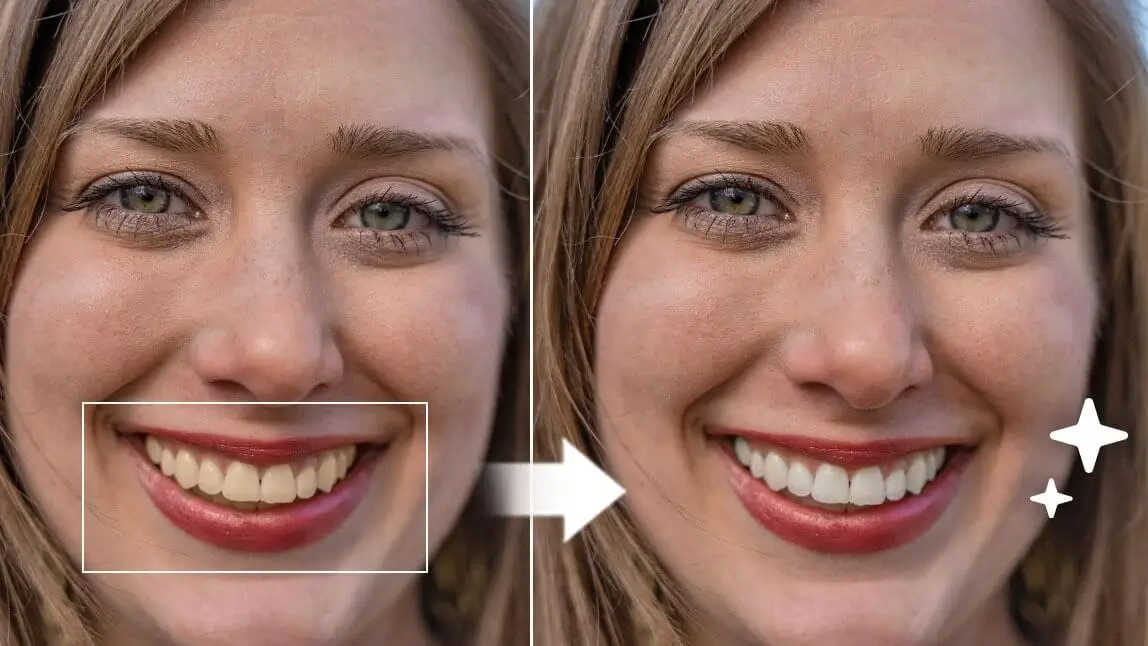
The AI Teeth Whitening API provides an advanced, automated solution for enhancing smiles in photos. Using intelligent image processing, it brightens teeth naturally and accurately, creating polished, professional results within seconds.

![](https://plugins-media.makeupar.com/smb/blog/post/2023-07-28/f05fda4d-8ca8-4661-b4b5-135067280a10.jpg)


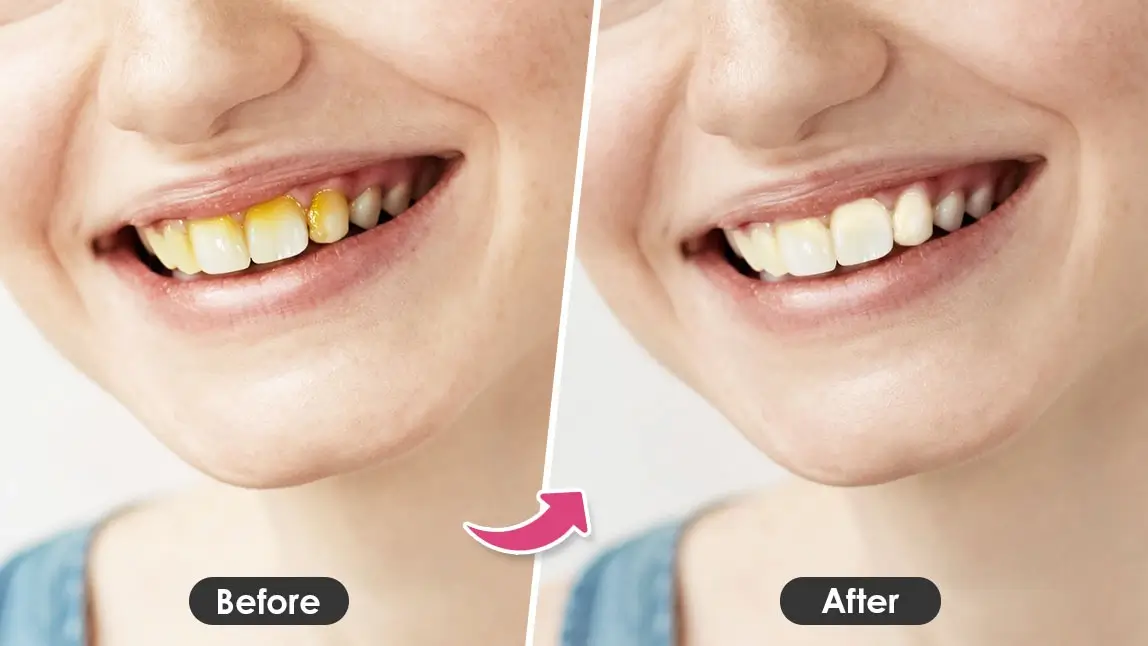
**How It Removes Yellow Teeth in Photos**

**Smart Whitening**  
The API automatically detects teeth and applies a natural-looking whitening effect without making the image appear artificial.

**Adjustable Levels**  
A built-in adjustment feature allows users to control the degree of whitening, from a subtle enhancement to a more pronounced, camera-ready finish.


**Key Features**

**Quick and Easy Enhancement**  
Achieve a noticeably brighter smile in just a few seconds.

**Accurate AI Detection**  
Advanced detection ensures that only teeth are modified, maintaining a realistic and balanced appearance.

**Adjustable Whitening Intensity**  
Users can fine-tune the whitening strength to match their preferred style.

**Natural Results with Advanced Algorithms**

The AI Teeth Whitening API uses sophisticated algorithms designed to identify teeth precisely and apply whitening effects that remain true to life. Users can refine the intensity to achieve a subtle, natural improvement, ensuring that the final result looks authentic and visually appealing.

---

## Integration Guide

* Take a Selfie

    *   Face the camera directly with proper lighting.
    *   Use the JS Camera Kit to capture the photo.

* Retrieve upload URLs and File IDs via ***/s2s/v2.0/file/teeth-whiten*** API

    Upload the following files using the upload URLs returned in the file API response:
    *   Your selfie photo

* Execute AI Task ***/s2s/v2.0/task/teeth-whiten***

    Run the AI task using file IDs or image URLs as the input source. Configure the effect parameters as desired.

* Poll Task Status

    Use the returned **task\_id** to monitor task progress.  
    Poll **GET /s2s/v2.0/task/teeth-whiten/{task_id}** to check the engine's status.  
    The task will remain in a **“running”** state until it is completed. No units are consumed while the task is running.


* **Usage demonstration**

![](https://plugins-media.makeupar.com/smb/blog/post/2022-05-13/26c04462-d183-4392-937b-f6173ff9e814.jpg)

![](https://plugins-media.makeupar.com/smb/blog/post/2025-07-01/webp_a4cd3779-2966-4b8f-888e-032dffc003c0.webp)

![](https://plugins-media.makeupar.com/smb/blog/post/2025-11-13/webp_5824c85f-813e-4c14-b036-38cba206ee0b.webp)

## File Specs & Errors
* Supported Formats & Dimensions

|Type|Supported Dimensions|Supported File Size|Supported Formats|
|  ----  | ----  | ----  | ----  |
|AI Teeth Whitening|Selfie Image:<br>    *   Long side ≤ 1920 px <br>    *   Short side ≥ 320 px |< 10MB|jpg/png|


* Error Codes

|Error Code|Description|
|  ----  | ----  |
| error_exceed_max_image_size | If the longer side of an image exceeds 1920 pixels |
|error_below_min_image_size|If your image is smaller than 320 pixels in width or height, it's too small to use|
|error_face_position_invalid|Your face needs to be fully visible in the image, without any parts cut off|
|error_face_position_too_small|The face in your photo is too small to analyze properly|
|error_face_position_out_of_boundary|Your face is either too large or partially outside the edges of the photo|
|error_insufficient_lighting|The lighting is too dim, which makes analysis difficult|
|error_face_angle_invalid|Your face angle isn't quite right. For front-facing shots, keep your head within 10 degrees of straight. For side-facing shots, the angle should be more than 15 degrees|

* Environment & Dependency

| Sample Code Language / Tool | Recommended Runtime Versions |
|---|---|
| cURL | - bash >= 3.2</br>   - curl >= 7.58 (modern TLS/HTTP support)</br>   - jq >= 1.6 (robust JSON parsing) |
| Node.js (JavaScript) | Node >= 18 (for global fetch) |
| JavaScript | - Chrome / Edge >= 80</br>   - Firefox >= 74</br>   - Safari >= 13.1 |
| PHP | PHP >= 7.4 (for modern TLS/compat), ext-curl (recommended) or allow_url_fopen=On + ext-openssl, ext-json |
| Python | Python >= 3.10 (for f-strings), requests >= 2.20.0 |
| Java | Java 11+ (for HttpClient), Jackson Databind >= 2.12.0 |

---


License: Privacy policy

## Servers

```
https://yce-api-01.makeupar.com
```

## Security

### BearerAuthenticationV2

Use the standard 'Bearer authentication'. Put your 'API Key' in header: \`Authorization:Bearer YOUR_API_KEY\`. Notice that there is ' ' a space between 'Bearer' and the 'YOUR_API_KEY'.

Type: http
Scheme: bearer

## Download OpenAPI description

[AI Teeth Whitening](https://docs.perfectcorp.com/_bundle/reference/ai_teeth_whitening.yaml)

## V1.0

Whitening teeth in photos using AI technology.

### Create a new file.

 - [POST /s2s/v2.0/file/teeth-whiten](https://docs.perfectcorp.com/reference/ai_teeth_whitening/v1.0/paths/~1s2s~1v2.0~1file~1teeth-whiten/post.md): To upload a new file, you'll first need to use the File API. It will give you a URL – use that URL to upload your file. Once the upload is finished, you can use the file_id from the same response to start using our AI features.

### Run an AI Teeth Whiten detection task.

 - [POST /s2s/v2.0/task/teeth-whiten/pre-process](https://docs.perfectcorp.com/reference/ai_teeth_whitening/v1.0/paths/~1s2s~1v2.0~1task~1teeth-whiten~1pre-process/post.md): Use the pre-process task when the source image may contain more than one valid target, or when your integration needs to explicitly choose which detected target receives the effect. For single-target images, pre-process can be skipped when the feature supports a default index value and your application does not need manual target selection.

The pre-process task detects candidate targets in the source image and returns their coordinates in data.results.result. Each item in the result array represents one detected target. Review the returned coordinates, map them to the intended face or region in the source image, and use that item's zero-based array index as the index value when creating the effect task.

For images with multiple detected faces or regions, do not rely on the default index value without checking the pre-process result. The effect is applied only to the target selected by index, so the integration must confirm the result item that corresponds to the intended target before running the effect task.

This task is asynchronous. After creating the task, handle completion with webhook if the feature supports it, or poll the corresponding pre-process status endpoint until data.task_status is success or error.

### Check the status of a AI Teeth Whiten detection task.

 - [GET /s2s/v2.0/task/teeth-whiten/pre-process/{task_id}](https://docs.perfectcorp.com/reference/ai_teeth_whitening/v1.0/paths/~1s2s~1v2.0~1task~1teeth-whiten~1pre-process~1%7Btask_id%7D/get.md)

### Run an AI Teeth Whiten task.

 - [POST /s2s/v2.0/task/teeth-whiten](https://docs.perfectcorp.com/reference/ai_teeth_whitening/v1.0/paths/~1s2s~1v2.0~1task~1teeth-whiten/post.md): AI tasks are asynchronous. Prefer webhook-based completion handling when the feature supports webhooks. Configure your webhook endpoint, verify webhook signatures, and use the received task_id to query the task result after a success or error notification. See the webhook integration guide for setup and verification details.

If webhooks are not supported for the feature, or if your integration cannot use webhooks, implement polling. After starting an AI task, keep polling the task status endpoint at the given polling_interval until the task status is either success or error.

Do not stop polling a running task for longer than the allowed polling window. If the task is not polled in time, the task may expire; a later status check can return InvalidTaskId even if processing finished, and the consumed units may still be charged.

### Check the status of a AI Teeth Whiten task.

 - [GET /s2s/v2.0/task/teeth-whiten/{task_id}](https://docs.perfectcorp.com/reference/ai_teeth_whitening/v1.0/paths/~1s2s~1v2.0~1task~1teeth-whiten~1%7Btask_id%7D/get.md)