AI Abs Filter
The AI Abs Filter API lets you add realistic abdominal definition to a photo and generate an athletic body-shaping result with minimal effort. Upload a full-body or upper-body image, select the desired enhancement mode, set the intensity level, and receive an edited output image.

Supported modes:
Six-pack: Adds visible six-pack abs for a more muscular torso appearance.Vest-line: Enhances central abdominal muscle definition for a fit, athletic look.
Input Requirements & Processing Criteria:
- Upload a full-body or upper-body image.
- Select an enhancement mode:
Six-packorVest-line. - Choose the desired abdominal enhancement intensity level.
- Maximum long-side image resolution must not exceed 4096 px.
- Source file size must be less than 10 MB.
- At least one detectable person is required, with both shoulders visible.
- The abdomen must be visible, either clothed or unclothed.
- Supported pose range:
−45° < yaw < 45°. - Single-person processing is supported. If multiple people appear in the image, the API automatically selects the person with the largest visible shoulder area.
Workflow:
- Upload file metadata using the File API.
- Retrieve the signed upload URL from the response.
- Upload the actual image to the returned URL.
- Create an AI task for abs-shape enhancement.
- Setup a Webhook or Poll the task status until completion.
- Download the generated result image when processing is successful.
Step 1 — Upload File Metadata Using the File API
Use POST /s2s/v2.0/file to create a file record and receive upload details for the source image.
curl --request POST \
  --url https://yce-api-01.makeupar.com/s2s/v2.0/file \
  --header 'Authorization: Bearer YOUR_API_KEY' \
  --header 'content-type: application/json' \
  --data '{
    "files": [
      {
        "content_type": "image/jpg",
        "file_name": "full_body_photo_01_3dbd1b6683.jpg",
        "file_size": 547541
      }
    ]
  }'
File API Sample Response:
{
  "status": 200,
  "data": {
    "files": [
      {
        "content_type": "image/jpg",
        "file_name": "full_body_photo_01_3dbd1b6683.jpg",
        "file_id": "SaGaqpDgKwFrVBgMpQMA3HY0LeqdT9/13W5TOD8/u/FfjK3xgCQ+hRt9MJXBFaud",
        "requests": [
          {
            "method": "PUT",
            "url": "https://yce-us.s3-accelerate.amazonaws.com/demo/ttl30/...signature...",
            "headers": {
              "Content-Length": "547541",
              "Content-Type": "image/jpg"
            }
          }
        ]
      }
    ]
  }
}
Step 2 — Retrieve File API Response Details
The response contains:
| Field | Description |
|---|---|
file_id | Identifier used to create the AI task. |
requests.url | Signed URL for uploading the actual image file. |
requests.method | Upload method, usually PUT. |
requests.headers | Required headers for the upload request. |
Step 3 — Upload Image to Provided URL
Use the requests.url from the File API response to upload the source image.
curl --location --request PUT 'https://yce-us.s3-accelerate.amazonaws.com/demo/ttl30/...signature...' \
  --header 'Content-Type: image/jpg' \
  --header 'Content-Length: 547541' \
  --data-binary @'./full_body_photo_01_3dbd1b6683.jpg'
Step 4 — Create an AI Task
Use POST /s2s/v2.0/task/abs-shape to create the abs-enhancement task.
| Parameter | Description | Example |
|---|---|---|
src_file_id | File ID returned from the File API upload flow. Required when using uploaded-file workflow. | "SaGaqpDgKwFrVBgMpQMA3HY0LeqdT9/13W5TOD8/u/FfjK3xgCQ+hRt9MJXBFaud" |
src_file_url | Direct URL of the source image. Use this alternative to src_file_id. | "https://example.com/selfie.jpg" |
mode | Enhancement mode. Supported values are Six-pack and Vest-line. | "Six-pack" |
intensity | Abdominal enhancement intensity level. | 1 |
Example Request:
const resp = await fetch(
  'https://yce-api-01.makeupar.com/s2s/v2.0/task/abs-shape',
  {
    method: 'POST',
    headers: {
      'Content-Type': 'application/json',
      Authorization: 'Bearer <YOUR_TOKEN_HERE>'
    },
    body: JSON.stringify({
      src_file_url: 'https://example.com/selfie.jpg',
      mode: 'Six-pack',
      intensity: 1
    })
  }
);

const data = await resp.json();
console.log(data);
AI Task API Response:
{
  "status": 200,
  "data": {
    "task_id": "SaGaqpDgKwFrVBgMpQMA3HY0LeqdT9_13W5TOD8_u_GPi6NqQ3dhlmN-6ntFwhzT"
  }
}
Step 5 — Setup a Webhook or Poll for Task Result
See the webhook integration guide for setup and verification details.
For polling, use the returned task_id to check task status.
curl --request GET \
  --url https://yce-api-01.makeupar.com/s2s/v2.0/task/abs-shape/<YOUR_TASK_ID> \
  --header 'Authorization: Bearer YOUR_API_KEY' \
  --header 'content-type: application/json'
Step 6 — Retrieve Result Image
When processing is successful, the response includes a download URL in data.results.url.
{
  "status": 200,
  "data": {
    "error": null,
    "results": {
      "url": "https://yce-us.s3-accelerate.amazonaws.com/demo/ttl30/...signature..."
    },
    "task_status": "success"
  }
}
Invalid API Key Response:
If the access token is invalid, the API returns a 401 response.
{
  "status": 401,
  "error": "Unauthorized",
  "error_code": "InvalidAccessToken"
}
Use cases: 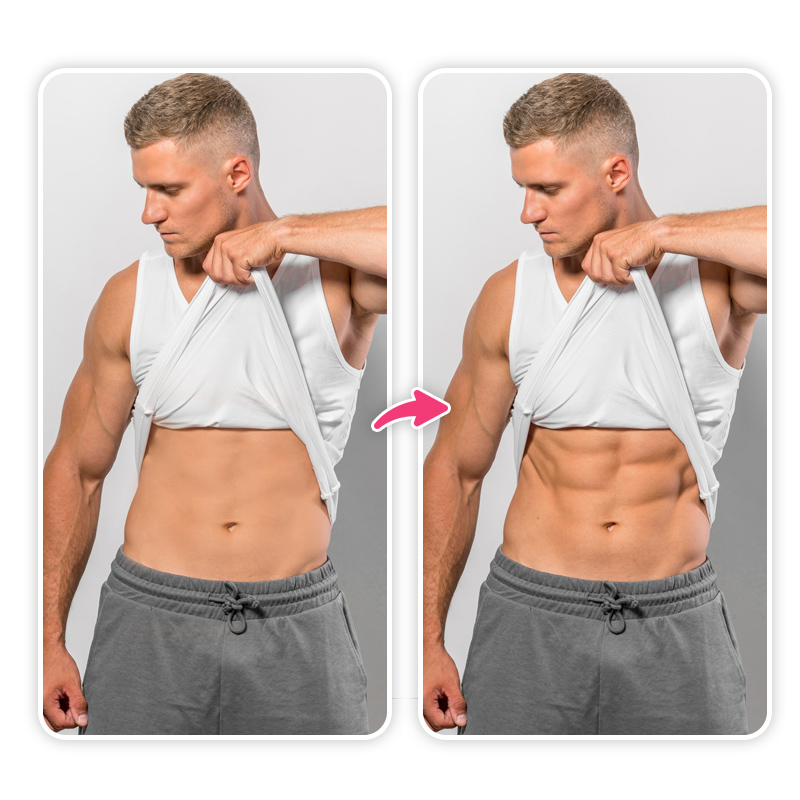
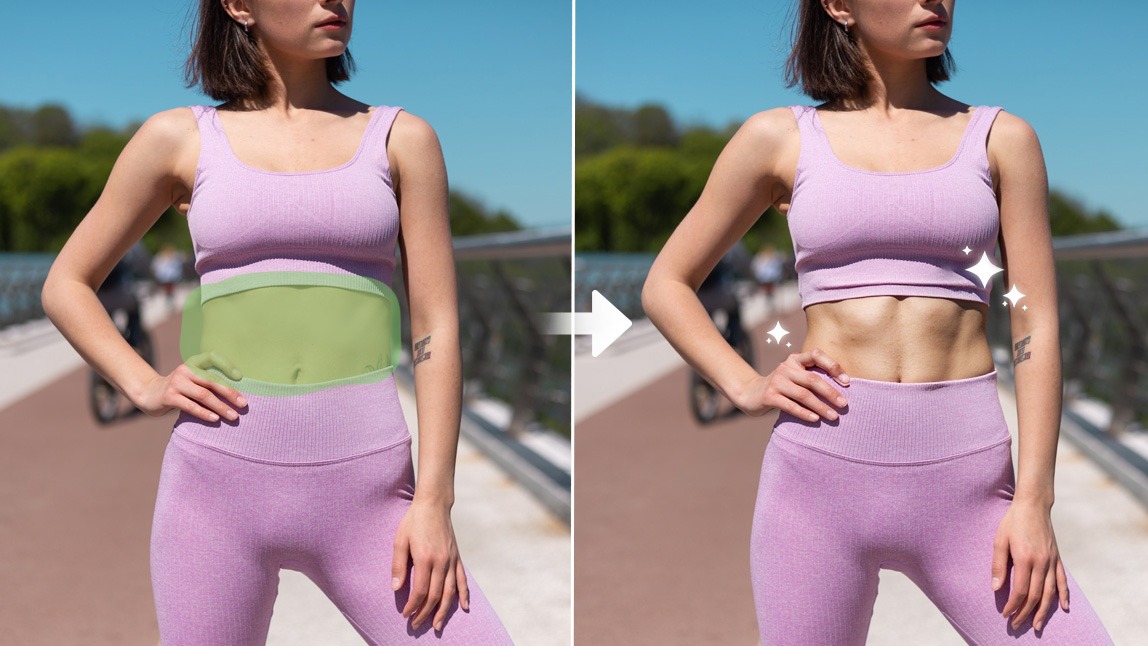
File Specifications:
| Specification | Requirement |
|---|---|
| Image type | Full-body or upper-body image. |
| Source subject | One detectable person with both shoulders visible and abdomen visible. |
| Pose requirement | Supported pose range is −45° < yaw < 45°. |
| Multi-person handling | If multiple people are detected, the API automatically selects the person with the largest visible shoulder area. |
| Maximum long-side resolution | Long side must not exceed 4096 px. |
| File size limit | Must be less than 10 MB. |
| Supported formats | jpg, png. |
Error Codes:
| Error Code | Description |
|---|---|
exceed_max_filesize | The source image exceeds the maximum allowed dimensions or file size. The long side must not exceed 4096 px, and the file size must remain below 10 MB. |
error_pose | Pose detection failed due to missing person detection, shoulder visibility issues, abdomen visibility issues, waist-region detection failure, hip-keypoint detection failure, or unsupported pose range. |
error_nsfw_content_detected | Potential NSFW content was detected in the source image or generated result image. |
invalid_parameter | Invalid parameters were provided for source keys, destination keys, actions, mode values, intensity levels, or task configuration. |
error_download_image | The source image could not be downloaded successfully. |
error_decode_image | The source image could not be decoded successfully. |
Environment & Dependencies:
| Tool / Language | Recommended Runtime Versions |
|---|---|
| cURL | Bash ≥ 3.2; curl ≥ 7.58 with modern TLS/HTTP support; jq ≥ 1.6 for robust JSON parsing. |
| Node.js | Node ≥ 18 for global fetch support. |
| JavaScript Browser Support | Chrome / Edge ≥ 80, Firefox ≥ 74, Safari ≥ 13.1. |
| PHP | PHP ≥ 7.4 with modern TLS compatibility; ext-curl recommended or allow_url_fopen=On with OpenSSL and JSON support. |
| Python | Python ≥ 3.10 for f-strings; requests ≥ 2.20.0. |
| Java | Java 11+ for HttpClient; Jackson Databind ≥ 2.12.0. |