AI Music Generator
Turn a theme, lyrics, and/or a music style into a complete song. Each AI Music Generator task composes one finished song (mp3) and returns it together with a cover image, the song title, the final lyrics, and a synchronized lyrics timeline.
- Vocal songs and instrumentals: generate a song with vocals, or instrumental music with no vocals and no lyrics (
instrumental: true). - Start from what you have: a theme (
idea), your own lyrics (lyrics), or both. An instrumental song requires anidea. - Lyrics language: ask for it in the
ideatext (e.g. "with Japanese lyrics"). Supported lyrics languages are English, Japanese, Korean, Portuguese, Spanish, German, French, Italian, Traditional Chinese, Simplified Chinese, Hindi, and Turkish.
Sample usage:

- AI Music Generator Usage Guide
This guide explains how to run an AI Music Generator task and read its result.
There is no image or audio input, so you don't need the File API: there is no "Create a new file" step before running a task. Just input your idea or lyrics, choose music_style, and create incredible songs.
- Step 1. Create a Task
Use the AI Task API (/s2s/v2.0/task/ai-song) with a theme, lyrics, and/or a music style:
curl --request POST \
  --url https://yce-api-01.makeupar.com/s2s/v2.0/task/ai-song \
  --header 'Authorization: Bearer YOUR_API_KEY' \
  --header 'content-type: application/json' \
  --data '{"idea":"A song about a small cafe that stays open late for people who cannot sleep","music_style":{"genre":"Acoustic Pop","mood":"Calm, hopeful","vocal":"female","description":"soft piano, brushed drums"},"instrumental":false}'
The response returns the task_id of this task:
{
  "status": 200,
  "data": {
    "task_id": "grH0CvsgXuAIHLUzD0V1Ol34hoet3R1tvdbtiVHrDb6_UqCLKIejAIajwxrhOAfe"
  }
}- Step 2. Poll for Task Result
Use the task_id from the run response to check the status until task_status is success or error:
curl --request GET \
  --url https://yce-api-01.makeupar.com/s2s/v2.0/task/ai-song/YOUR_TASK_ID \
  --header 'Authorization: Bearer YOUR_API_KEY' \
--header 'content-type: application/json'- Step 3. Retrieve Result
A successful response includes the song, its cover image, title, final lyrics, and synchronized lyrics timestamps:
{
  "status": 200,
  "data": {
    "error": null,
    "results": {
      "url": "https://example.com/sample-song-url",
      "cover_urls": [
        "https://example.com/sample-cover-url"
      ],
      "title": "Leave the Light On",
      "lyrics": "[verse]\nTwo a.m., the neon hums\nSteam on the glass, the night still runs",
      "duration": 154.3,
      "timestamps": "{\"lyrics_lrc_timestamps\": \"[00:23.98]Two a.m., the neon hums\"}"
    },
    "task_status": "success"
  }
}- Request Body
| Field | Type | Description |
|---|---|---|
| idea | string (max 500 characters) | Theme of the song. Required when instrumental is true. For a song with vocals, provide idea, lyrics, or both. |
| lyrics | string (max 3000 characters) | Lyrics of the song. Section tags such as [intro], [verse], [chorus], and [outro] are supported. |
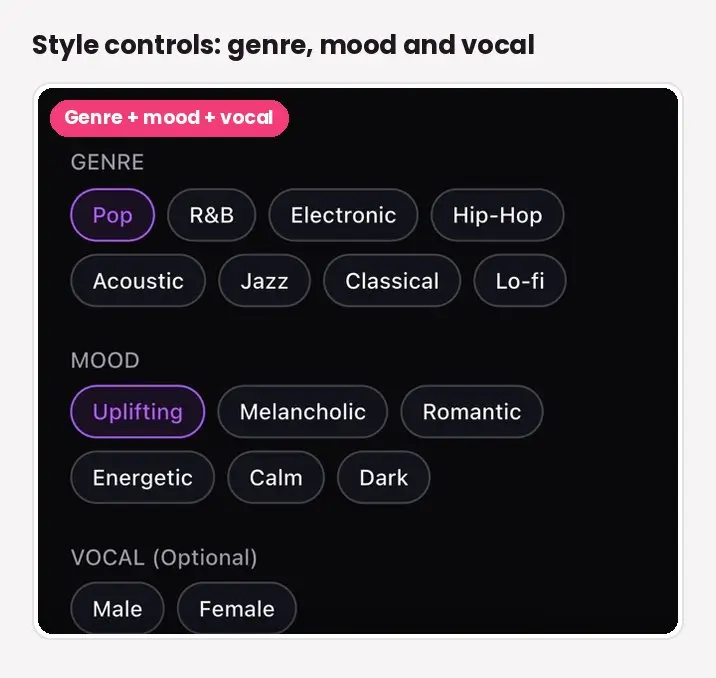
| music_style | object | Music style of the song: genre (max 100), mood (max 100), vocal (female or male, ignored for instrumentals), and description (max 300) for other details such as instruments or rhythm. All fields are optional. |
| instrumental | boolean | true to generate instrumental music with no vocals and no lyrics. Default false. |
A request must describe a song one of these ways: from an idea (idea is not empty), or from lyrics for a song with vocals (lyrics is not empty and instrumental is not true).
- Results (
data.results)
| Field | Type | Description |
|---|---|---|
| url | string | URL to download the generated song (mp3). Valid for 2 hours |
| cover_urls | array of string | URLs to download the cover images (jpg). Currently one image. Valid for 2 hours |
| title | string | Generated title of the song |
| lyrics | string | Final lyrics of the song. Empty for instrumental music |
| duration | number | Length of the song in seconds |
| timestamps | string | JSON-encoded string of an object whose lyrics_lrc_timestamps field holds the synchronized lyrics in LRC format, e.g. [00:08.54]Lyrics text. The LRC text is empty for instrumental music |
- Supported Limits
| Type | Limit |
|---|---|
| idea (theme) | Max 500 characters. Required when instrumental is true |
| lyrics | Max 3000 characters. Section tags such as [intro], [verse], [chorus], and [outro] are supported |
music_style genre / mood | Max 100 characters each |
music_style description | Max 300 characters |
| Input file | None. There is no image or audio input, so no File API step is needed |
| Output | Song: mp3. Cover image: jpg. Result URLs are valid for 2 hours |
- Error Codes
| Error Code | Description |
|---|---|
| invalid_parameter | Invalid parameter value, e.g. neither idea nor lyrics is provided, idea is missing for an instrumental task, or a field exceeds its maximum length |
Task-level failures are reported in the status response:
data.erroris the error code anddata.error_messageis a detailed description of the error.