AI Outfit Virtual Try-On Mix & Match
Try on a whole outfit in one call. Send one user photo together with 1 to 9 garment reference photos, and the AI Outfit Virtual Try-On Mix & Match API dresses the person with every garment at once and returns one styled photo.
- One call, one look: a single task dresses the person with all reference garments and returns exactly one result photo.
- Eight garment categories:
upper_body,lower_body,full_body,outer,shoes,bag,headwear,accessory. - Styling note: say how to wear the pieces, for example "wear the jacket open" or "tuck the top in". It changes only how the garments are worn, never the garments, the person, or the pose.
Sample usage:
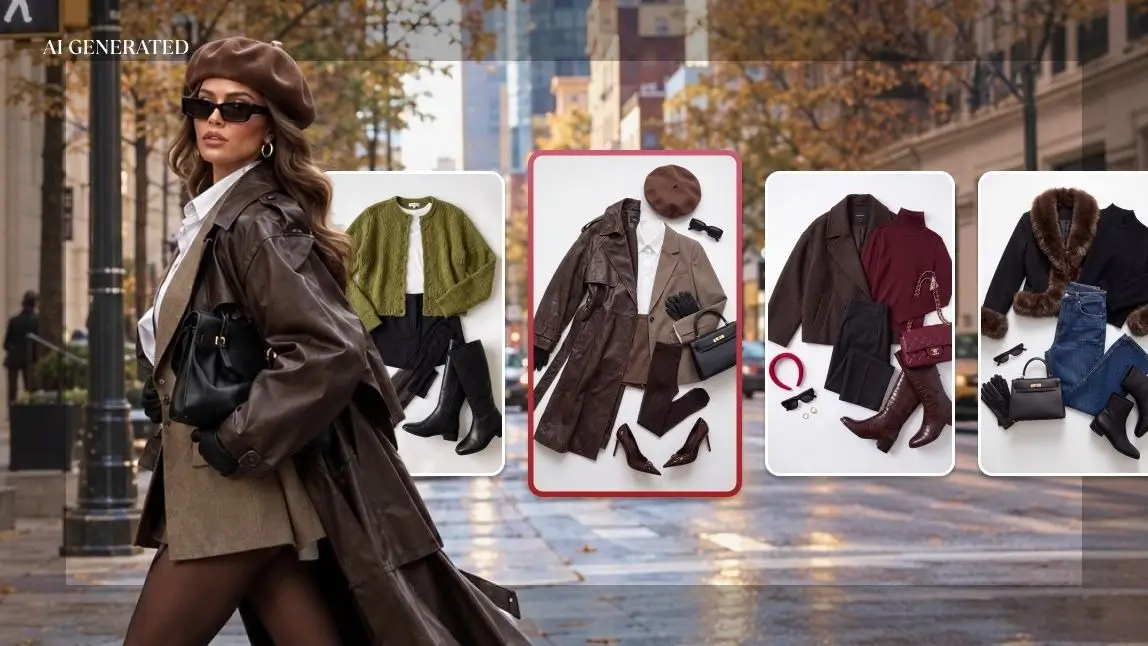

- AI Outfit Virtual Try-On Mix & Match Usage Guide
This guide explains how to upload the user photo and the reference garments, create a try-on task, and read the result. The task is asynchronous: the run task response returns a task ID, and you poll the status endpoint for the result.
- Step 1. Upload the Photos Using the File API
Use the File API (/s2s/v2.0/file) to upload one user photo and 1 to 9 reference photos, one garment per photo. The response gives a file_id and a requests.url for each file; upload the file bytes to that URL. You can also host the photos publicly and pass their URLs instead.
Keep the reference photos and the garment categories in the same order: the n-th reference photo is the garment whose category is the n-th entry of garment_categories.
- Step 2. Create a Try-On Task
Use the AI Task API (/s2s/v2.0/task/cloth-mix-v2) with the user photo, the reference photos, one category per reference photo, and an optional styling note:
curl --request POST \
  --url https://yce-api-01.makeupar.com/s2s/v2.0/task/cloth-mix-v2 \
  --header 'Authorization: Bearer YOUR_API_KEY' \
  --header 'content-type: application/json' \
  --data '{
    "src_file_url": "https://example.com/selfie.jpg",
    "ref_file_urls": [
      "https://example.com/1.jpg",
      "https://example.com/2.jpg",
      "https://example.com/3.jpg"
    ],
    "garment_categories": ["upper_body", "lower_body", "shoes"],
    "styling_note": "tuck the top in"
  }'
garment_categoriesis required and must have the same length as the reference photo array; a different length returnsinvalid_parameter. A task takes about 40 to 50 seconds, plus 3 to 4 seconds more when a styling note is given. A task that is not finished after 400 seconds fails withunknown_internal_errorand can be retried.
- Step 3. Poll for Task Result
Use the task_id from the run response to check the status until task_status is success or error:
curl --request GET \
  --url https://yce-api-01.makeupar.com/s2s/v2.0/task/cloth-mix-v2/YOUR_TASK_ID \
  --header 'Authorization: Bearer YOUR_API_KEY' \
--header 'content-type: application/json'- Step 4. Retrieve Result
A successful response returns one styled photo. When a styling note was given, not_applied reports the parts of the note that were skipped and why; everything else is applied as usual.
{
  "status": 200,
  "data": {
    "error": null,
    "results": {
      "url": "https://example.com/sample-result-url",
      "not_applied": "bottom high-waisted: the trousers are already high-waisted"
    },
    "task_status": "success"
  }
}
Units are charged only when a result photo is returned. A task that returns an error is not charged.
- Request Body
src_file_url / src_file_id: pass one of them. ref_file_urls / ref_file_ids: pass one of them.
| Field | Type | Required | Default | Description |
|---|---|---|---|---|
| src_file_url / src_file_id | string | Yes* | - | The user photo, as a publicly accessible URL or a File ID from the File API |
| ref_file_urls / ref_file_ids | array of string | Yes* | - | 1 to 9 reference photos, one garment per photo, in the same order as garment_categories |
| garment_categories | array of string (enum) | Yes | - | Category of each reference photo, same order and same length as the reference photo array: upper_body, lower_body, full_body, outer, shoes, bag, headwear, accessory |
| styling_note | string | No | "" | How to wear the garments, free text up to 300 characters, e.g. "tuck the top in", "wear the jacket open", "carry the bag crossbody" |
- Garment categories
| garment_category | Content | Maximum |
|---|---|---|
| upper_body | Top | 1 |
| lower_body | Bottom | 1 |
| full_body | One-piece, e.g. a dress | 1, cannot be combined with upper_body or lower_body |
| outer | Jacket, vest | 1 |
| shoes | Shoes | 1 |
| bag | Bag | 1 |
| headwear | Hat, headband | 1 |
| accessory | Glasses, necklace, earrings, watch, belt, scarf | 3 |
The categories you send are used as given; the engine does not reclassify them. Placement of accessories is decided by the engine, and a new accessory replaces the one the person wears in the same place.
- Results (
data.results)
| Field | Type | Description |
|---|---|---|
| url | string | URL to download the result photo. Valid for 2 hours |
| not_applied | string | Parts of styling_note that were not applied, with the reasons. Returned only when styling_note is given |
- Supported Formats & Dimensions
| Item | Supported Dimensions | Supported File Size | Supported Formats |
|---|---|---|---|
| User photo | Front-facing photo. Minimum 512 x 384, longest side 4096 px. Aspect ratio up to 3:1; more is cropped from the center | < 10MB | JPEG, PNG, HEIC |
| Reference photo | Minimum 512 x 384, longest side 4096 px. Not cropped (belts, necklaces and similar may exceed 3:1) | < 10MB | JPEG, PNG, HEIC |
| Result photo | Keeps the aspect ratio of the user photo, within about 1.5 MP (1024 x 1536); a long side below 1024 is upscaled to 1024. Example: 3000 x 4000 -> 1072 x 1440, 4000 x 1000 -> 2160 x 720 | - | JPEG |
Photos with a transparent background are flattened on a white background. Result photos carry a C2PA signature.
- Error Codes
| Error Code | Description |
|---|---|
| invalid_parameter | A parameter is missing or invalid; the message names the parameter |
| error_download_image | The user photo or a reference photo could not be downloaded |
| error_invalid_src | The user photo could not be read |
| error_invalid_ref | A reference photo could not be read |
| error_analyze_failed | Garment analysis failed or timed out |
| error_ref_categories | The garments cannot be worn together: a repeated category, full_body combined with upper_body or lower_body, more than 1 bag or headwear, or more than 3 accessory |
| error_nsfw_content_detected | Inappropriate content, generation refused |
| unknown_internal_error | Any other error, including a task that did not finish within 400 seconds |
| Reference photos | Unit Consumed |
|---|---|
| 1 piece try-on | 3 units |
| 2 pieces try-on | 4 units |
| 3 pieces try-on | 5 units |
| 4 pieces try-on | 6 units |
| 5 pieces try-on | 7 units |
| 6 pieces try-on | 8 units |
| 7 pieces try-on | 9 units |
| 8 pieces try-on | 10 units |
| 9 pieces try-on | 11 units |
Units are charged only when a result photo is returned; a task that returns an error is not charged.