AI Retake
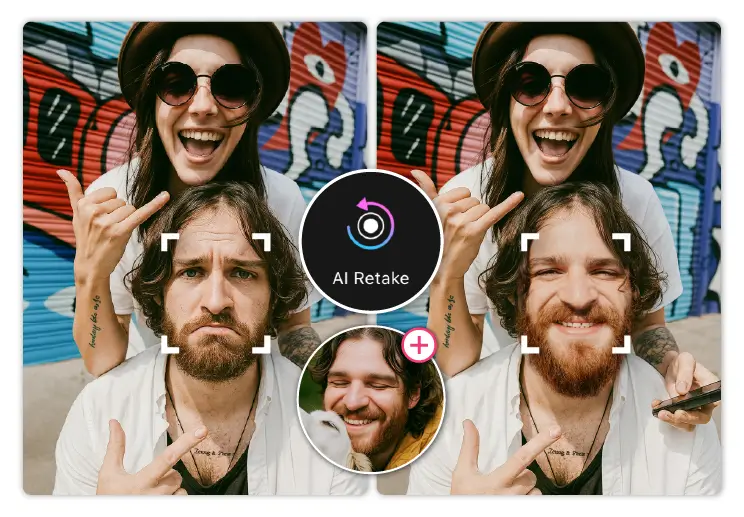
Keep the moment. Rebuild the faces. AI Retake lets you rebuild any group photo, one face at a time. Either for creating funny pictures of faces, or need a professional tool, we've got you covered.

How to implement AI Retake
Step 1: Upload source and reference images
- Request upload URLs from the API:
POST https://yce-api-01.makeupar.com/s2s/v2.0/file
Authorization: Bearer YOUR_API_KEY
Content-Type: application/json
Body:
{
    "files": [
    {
        "file_name": "target.jpg",
        "file_size": 123456,
        "content_type": "image/jpeg"
    }
    ]
}
The response provides a pre-signed upload URL and a
file_id.Upload your file with an HTTP PUT request to the given URL.
Store the
file_idfor later use. Repeat this for both target and reference images.Upload the actual file to the upload URL.
Step 2: Pre-process the source and reference images (face detection)
- Create a pre-process task:
POST https://yce-api-01.makeupar.com/s2s/v2.0/task/retake/pre-process
Authorization: Bearer YOUR_API_KEY
Content-Type: application/json
Body:
{ "request_id": 1, "payload": { "file_sets": { "src_ids": ["TARGET_FILE_ID"] }, "actions": [ { "id": 0 } ] } }- The API returns a
task_id. - Poll task status at:
GET https://yce-api-01.makeupar.com/s2s/v2.0/task/retake/pre-process?task_id=TASK_ID- When finished, you receive a list of detected faces with bounding boxes.
Step 3: Run the AI Retake task
- Define which reference image will substitute each source image The
face_mappingarray defines how faces in the Source Image are replaced by the face from the Reference Image. It acts as a link list connecting detected faces in the source to specific reference image.
Only one face replacement is supported per request. All non-target faces must be set to
{"index": -1, "position": -1}. Attempting to replace more than one face will returnerror_change_too_many_faces. Requests that return this error are not charged. Only the first detected face in the Reference Image is supported, so index must always be 0.Parameters
Parameter Type Description position integer Index of the detected face in the Source Image (e.g., 0, 1, 2). index integer Reference face index. Currently, only the first detected face is supported, so this value must be 0. Rules
- Single Face Replacement: Only one source face can be mapped to a reference face per request.
- Skip a Face: Set both index and position to -1.
- Reference Face Index: Only the first detected face in the Reference Image is supported, so index is always 0.
Example
Scenario
- Reference Image: 1 image containing a single supported face.
- Source Image: 4 detected faces (Face 0, Face 1, Face 2, Face 3).
- Goal: Replace Face 2 only and leave Face 0, Face 1 and Face 3 unchanged.
    "face_mapping": [
        {
            "index": -1, // Skip replacing
            "position": -1 // Skip replacing
        },
        {
            "index": -1, // Skip replacing
            "position": -1 // Skip replacing
        },
        {
            "index": 0, // Always use the first reference image
            "position": 2 // Apply to the third detected face in source
        },
        {
            "index": -1, // Skip replacing
            "position": -1 // Skip replacing
        },
    ]
- Send the main task request:
POST https://yce-api-01.makeupar.com/s2s/v2.0/task/retake
Authorization: Bearer YOUR_API_KEY
Content-Type: application/json
Body:
{ "request_id": 2, "payload" : { "file_sets": { "src_ids": ["TARGET_FILE_ID" ], "ref_ids": ["REFERENCE_FILE_ID"] }, "actions" : [ { "id" : 0, "params": { "face_mapping": [ {"index": -1, "position": -1}, {"index": -1, "position": -1}, {"index": 0, "position": 2}, {"index": -1, "position": -1} ] } } ] } }- The response returns a
task_id.
- Define which reference image will substitute each source image The
Step 4: Poll task status and retrieve result It’s necessary to implement a timed loop that queries the task status at regular intervals within the allowed polling window.
- Poll at:
GET https://yce-api-01.makeupar.com/s2s/v2.0/task/retake?task_id=TASK_ID- When
statusissuccess, the response contains a URL for the generated image. - Download or display the image from that URL.
Step 5: Integrate into your platform
- On a web frontend, you can directly implement this with JavaScript using fetch or Axios.
- On a backend (Node.js, Python, Java, PHP, etc.), you can use the same endpoints with standard HTTP libraries.
- Implement retry and error handling since the tasks run asynchronously.
Debugging Guide
- Why are some faces not detected in my source image
Why: Reason: The face must be clearly visible, not covered or obstructed, and large enough within the image
Solution: Try taking a photo where the face appears larger and is clearly visible without any covering or obstruction
- Why are some faces not detected in my source image

- Supported Formats & Dimensions
| AI Feature | Supported Dimensions | Supported File Size | Supported Formats |
|---|---|---|---|
| AI Retake | Input and output: the long side must be less than or equal to 4096 pixels | < 10MB | jpg/jpeg/png |
- Error Codes
| Error Code | Description |
|---|---|
| exceed_max_filesize | The input file size exceeds the maximum limit |
| invalid_parameter | The parameter value is invalid |
| error_download_image | There was an error downloading the source image |
| error_download_mask | There was an error downloading the mask image |
| error_decode_image | There was an error decoding the source image |
| error_decode_mask | There was an error decoding the mask image |
| error_download_video | There was an error downloading the source video |
| error_decode_video | There was an error decoding the source video |
| error_nsfw_content_detected | NSFW content was detected in the source image |
| error_no_face | No face was detected in the source image |
| error_pose | Failed to detect pose in the source image |
| error_face_parsing | Failed to perform face parsing on the source image |
| error_inference | An error occurred in the inference pipeline |
| exceed_nsfw_retry_limits | Retry limits exceeded to avoid generating NSFW image |
| error_upload | There was an error uploading the result image |
| error_multiple_people | People count exceeds the maximum limit |
| error_no_shoulder | Shoulders are not visible in the source image |
| error_large_face_angle | The face angle in the uploaded image is too large |
| error_unsupport_ratio | The aspect ratio of the input image is unsupported |
| error_change_too_many_faces | Only one face replacement is supported per request. All non-target faces must be set to {"index": -1, "position": -1}. Attempting to replace more than one face will return the error. |
| unknown_internal_error | Other internal errors |